


Device and Email Basics Training: A Stress-Free Guide for Everyday Kiwis

Updated: Apr 20
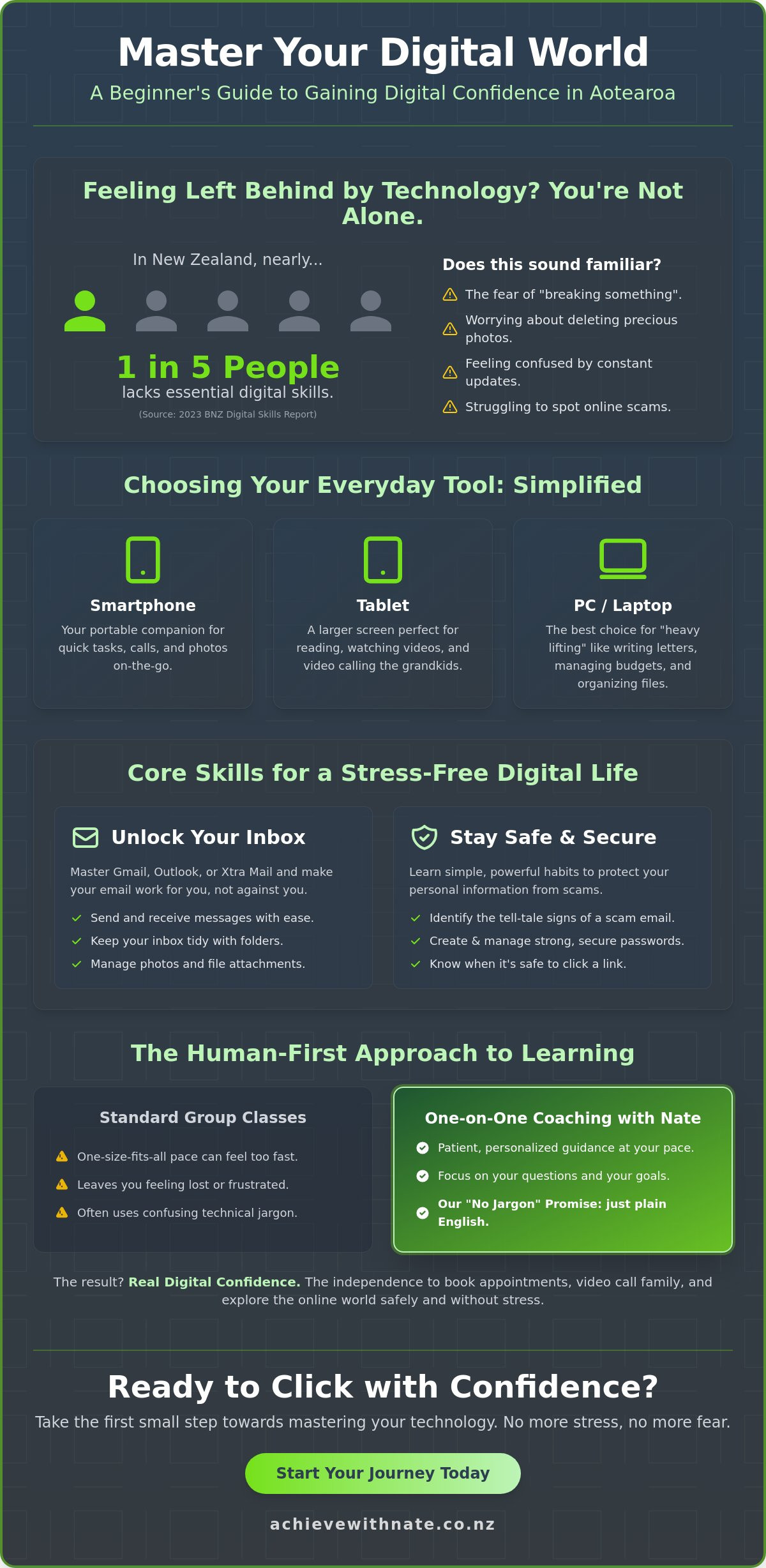
Last Tuesday, Margaret sat at her kitchen table in Napier, staring at a flashing "System Update" notification on her tablet. She felt that familiar knot of worry in her stomach. What if it deletes her photos? What if it breaks the app she uses to see her grandkids? According to the 2023 BNZ Digital Skills Report, roughly 1 in 5 New Zealanders lack the essential skills to feel safe and capable online. You aren't alone if those constant pop-ups feel more like a threat than a help.
We believe technology should serve you, not stress you out. That's why our device and email basics training focuses on a patient, human-first approach for everyday Kiwis. You'll learn to manage your smartphone, tablet, and inbox with a sense of calm and clarity. We promise to help you build the digital confidence needed to video call your family and keep your personal information safe from scams. This guide explores how to master your devices one small step at a time, from cleaning out your inbox to clicking with confidence.
Key Takeaways
Build your digital confidence by learning to navigate the online world of Aotearoa without the fear of hitting the wrong button.
Simplify your tech choices by understanding whether a smartphone, tablet, or PC best fits your daily needs and lifestyle.
Unlock the secrets of your inbox with device and email basics training that makes managing Gmail, Outlook, or Xtra Mail feel completely natural.
Keep your personal information safe with easy-to-follow habits for identifying scams and managing secure passwords.
Discover the benefits of patient, one-on-one coaching that prioritizes your progress over confusing jargon.
Table of Contents Why Mastering Device and Email Basics is the Key to Digital Confidence Understanding Your Digital Ecosystem: Smartphones, Tablets, and PCs The World of Email: Navigating Gmail, Outlook, and Xtra Mail Essential Digital Habits for a Secure and Stress-Free Life Achieving Digital Confidence: Why One-on-One Coaching Works
Why Mastering Device and Email Basics is the Key to Digital Confidence
Digital confidence isn't about knowing how to code or being a computer genius. It's the simple, quiet ability to use your phone or computer without that nagging fear of failure. For many everyday Kiwis, technology feels like a fast-moving train that left the station without them. If you feel a bit shaky when a new update pops up, you aren't alone. It's completely okay to feel overwhelmed by how quickly things change in Aotearoa.
Staying connected is now a vital part of modern life. Whether you're in Auckland or a small town in Southland, we all need these tools to stay in the loop. According to the 2021 Digital Inclusion User Insights report, about 20% of New Zealanders lack the basic skills to fully participate in our digital society. This gap is what we call the "Digital Divide," and closing it is essential for your independence. My device and email basics training is designed to bridge this gap. I offer a "no jargon" promise. We strip away the confusing tech-speak and replace it with plain, friendly English. We focus on the person, not just the software.
The Emotional Hurdle of Learning Technology
The biggest barrier to learning isn't a lack of intelligence; it's the fear of "breaking it." I hear it all the time. People worry that one wrong click will ruin their device or delete years of photos. I provide a patient perspective that removes this pressure. Group classes often fail beginners because they move at a pre-set speed, leaving those who need a bit more time feeling lost and frustrated. Digital confidence is a human-first skill, not a technical one. It's about your comfort and your peace of mind.
How Device and Email Training Changes Your Daily Life
Mastering the basics opens up your world in ways you might not expect. It means you can book a doctor appointment online at 10:00 PM or check the latest NZ news whenever you like. You might find yourself wondering about the history of these tools, such as What is email? and how it evolved into the primary way we communicate today. Understanding this foundation gives you back your time and your dignity.
The real win is the freedom you gain. You won't have to wait for a busy family member to stop by just to help you send a photo or find a lost file. This independence is powerful. Once you have these basics down, you've built a solid foundation. From here, you can explore more advanced tools like AI or new business workflows with a sense of calm. We take it one small step at a time.
Understanding Your Digital Ecosystem: Smartphones, Tablets, and PCs
Getting started with device and email basics training doesn't have to feel like learning a foreign language. Think of your digital tools as a simple ecosystem designed to make your life easier. For most everyday Kiwis, this ecosystem is built around the "Big Three" devices. Smartphones are your portable companions for quick tasks. Tablets offer a larger screen for reading the news or video calling the grandkids. PCs or laptops remain the best choice for heavy lifting, like writing long letters or managing detailed budgets.
Choosing between Apple and Android is often the first hurdle. Apple devices use a system called iOS, which is known for being very consistent and straightforward. Android devices, made by companies like Samsung or Spark, offer more variety in how they look and feel. Neither is better than the other; it's simply about what feels most comfortable in your hand. Most people find that once they learn one, the other becomes much easier to understand.
The "Cloud" is a term that causes a lot of unnecessary worry. In simple terms, the cloud is just a digital storage locker that lives on the internet rather than inside your phone. When you take a photo on your smartphone, the cloud safely copies it so you can see it on your tablet later. It's a brilliant way to ensure your precious memories aren't lost if a device gets misplaced. Keeping your hardware happy is just as simple. Use a soft, dry microfibre cloth for screens and try to keep your battery between 20% and 80% to help it last for years.
Smartphone and Tablet Basics for Kiwis
Navigating a screen is all about "gestures." A quick tap is like a click, while a swipe moves you through pages like turning a book. If you ever feel lost, look for the "Home" button or bar at the bottom to start fresh. To keep things running smoothly, check for software updates once a month. For New Zealanders, having the right tools makes a huge difference. You can manage your money with the ANZ or Westpac apps, or access thousands of free books through the Libby app using your Auckland or Christchurch library card. If you're feeling stuck, Nate can help you find digital confidence through personalized support.
Connecting to the World: Wi-Fi and Data
Understanding how you connect is vital for your monthly budget. Home Wi-Fi is usually "unlimited" and comes from your router. Mobile data comes from your SIM card and is best used when you're out and about. According to 2023 data from Statistics New Zealand, 93% of Kiwis now use the internet daily, but many still feel uneasy about public Wi-Fi. When you're at a cafe, it's wise to follow online safety basics by avoiding banking or private logins on shared networks. If you see a "No Internet" message, don't panic. Usually, turning your Wi-Fi off and back on again solves the problem in under 30 seconds. We take it one small step at a time.
The World of Email: Navigating Gmail, Outlook, and Xtra Mail
Think of your email address as your digital passport. By 2026, it will be nearly impossible to book a doctor's appointment, check your pension, or shop online without one. It's your primary ID for the online world. Our device and email basics training helps you feel at home with this essential tool. Whether you use a phone or a computer, your email is your direct line to family and services in Aotearoa.
Gmail, Outlook, and Xtra are the three big names for everyday Kiwis. Gmail is built by Google. It's simple and works perfectly on Android phones. Outlook is a Microsoft product; it feels familiar if you used computers in an office. Xtra Mail is the Spark service many of us have used for decades. While Spark moved Xtra to a paid model in May 2024, it remains a favorite because of its local history.
Understanding the anatomy of an email makes life much calmer. The Subject Line is like the title of a book; it tells the reader what is inside. CC stands for Carbon Copy. Use this to keep someone in the loop without expecting a reply. BCC is Blind Carbon Copy. This is perfect for sending a message to a group while keeping everyone's address private. Attachments are the digital envelopes holding your photos or documents.
Setting up your email on a phone app is great for quick updates while you're out. Using a browser on a laptop is better for writing long letters or organizing your history. Both systems sync together. What you delete on your phone will disappear from your computer too. This keeps everything tidy across all your tech.
Choosing the Right Email Service
Gmail is often the top choice for people who want a clean, simple look. It offers 15GB of free storage, which lasts most people several years. Outlook is slightly more complex but offers great calendar features. Xtra Mail is excellent if you value talking to a New Zealand-based support team when things go wrong. Here is how they compare:
Gmail: Very high ease of use. 15GB free storage. Support is mostly online help articles.
Outlook: Good ease of use. 15GB free storage. Support includes online chat and community forums.
Xtra (Spark): High ease of use for long-time users. Paid storage plans. NZ-based phone support available.
Email Management 101: Keeping Your Inbox Calm
A cluttered inbox feels like a messy house. The Read and File method is the best way to stay organized. Once you read an email, decide its fate immediately. Delete it, reply to it, or move it to a folder. This stops your inbox from hitting that scary 1,000 unread mark. No jargon, no pressure; just simple habits.
Unsubscribing is your secret weapon. Look for the tiny "unsubscribe" link at the very bottom of retail or news emails. It's like putting a "No Circulars" sticker on your physical letterbox. It keeps the digital noise down. You can also create folders with simple names like "Bills," "Family," or "Travel." This makes finding that one specific flight booking much faster. Taking these small steps through device and email basics training ensures you stay in control of your digital life.
Essential Digital Habits for a Secure and Stress-Free Life
Feeling a bit uneasy about the internet is completely normal. Technology moves fast, and it can feel like the rules change every week. However, staying safe doesn't require a computer science degree. It just takes a few simple, protective habits. Think of these habits as a digital seatbelt; they keep you secure while you enjoy the ride. Our device and email basics training focuses on building these small, manageable routines so you can browse with peace of mind.
Security starts with your passwords. Many people use one password for everything because it's easier to remember. This is a common trap. If a scammer finds that one key, they can open every door to your digital life. Aim for unique passwords for your email and your bank at the very least. If you're worried about forgetting them, we can show you how to use a physical notebook or a secure digital tool to keep track. No jargon, no pressure; just a system that works for you.
Protecting your memories is just as vital as protecting your data. In 2023, CERT NZ reported that thousands of Kiwis lost access to precious files due to hardware failure or scams. Backing up your device ensures your family photos and important documents are safe. Whether you use a physical thumb drive or a cloud service like iCloud or Google Drive, having a second copy means a broken phone isn't a heartbreak.
Step-by-Step Guide to Identifying a Scam Email
Scammers are clever, but they usually follow a predictable pattern. Before you click any link in an email, run through this quick checklist:
Check the sender: Look closely at the email address. A real email from a business like Air New Zealand or the IRD will have a clean, official address. If it's a string of random letters and numbers, it's a red flag.
Look for urgency: Scammers want you to panic. Phrases like "Account suspended" or "Action required immediately" are designed to make you act before you think.
The "Hover" trick: If there's a big button, don't click it yet. Move your mouse over it without clicking. A small box will appear showing you the real web address. If it looks strange, delete the email.
Maintaining Your Digital Wellbeing
A cluttered phone can lead to a cluttered mind. You don't have to be at the beck and call of your device. Turning off non-essential notifications is a great first step toward a calmer life. You don't need your phone to beep every time a shop has a sale or a stranger "likes" a photo. By choosing which apps are allowed to interrupt you, you take back control of your time.
Try a ten-minute "Digital Tidy-up" once a week. Use this time to delete blurry photos, clear out your "Promotions" folder in your email, and move your most-used apps to the front screen. This simple routine builds device and email basics training into your everyday life, making your tech feel like a helpful tool rather than a source of stress. It's about taking one small step at a time to build your digital confidence.
Ready to feel more in control of your technology? Book a free clarity call to see how we can help you stay safe online.
Achieving Digital Confidence: Why One-on-One Coaching Works
Learning to use your computer or phone shouldn't feel like a chore. Many people try to teach themselves through YouTube videos. While those videos are free, they can't see your screen. They don't know which button is missing on your specific iPad or why your login screen looks different. That's where the Achieve With Nate difference comes in. It's about empathy, patience, and real Kiwi heart. Nate provides a no judgment zone where no question is too small. This isn't a cold, crowded classroom; it's a supportive partnership designed for your peace of mind.
Personalized coaching beats generic classes because it focuses on your life. Instead of staring at a screen and feeling your heart rate rise, you'll have a friendly expert sitting right there with you. We don't use complex manuals. We use conversation. This human-first approach ensures you feel seen and understood rather than patronized. It's about making tech work for you, not the other way around.
This tailored approach is effective for any complex skill; just as you might visit Pass4you Driving School to learn to drive with confidence, or seek professional coaching from Pipman (פיפמן) to master physical fitness and sports, Nate provides the same level of individual attention for your digital journey.
Tailored Learning for Your Specific Needs
Your needs are unique. A generic community college course might spend three weeks on things you already know. With Nate, there's no curriculum but yours. We work on exactly what you need most today. If you want to focus on attaching photos to emails for your grandkids, that's what we do. You'll learn at your own pace without feeling pressured to keep up with a group. Learn how a digital confidence coach NZ can transform your relationship with tech.
During a device and email basics training session, you can expect a calm, steady environment. Nate sits with you, either in person or through a simple video link. You bring your "stuck" points, and we walk through them together. You'll do the clicking yourself. This hands-on practice helps the memory stick much better than just watching someone else do it. We focus on the big wins first, like:
Organizing your inbox so you don't miss important mail.
Setting up secure passwords that you can actually remember.
Navigating your specific tablet, phone, or laptop with ease.
Identifying and avoiding common online scams.
Ready to Start Your Journey?
The path from feeling overwhelmed to feeling capable is shorter than you think. It starts with one small step. You don't have to be a tech expert to live a full, connected digital life. The Achieve With Nate movement is for everyday Kiwis who want to stay in touch with family and handle their own affairs online with pride. It's about reclaiming your independence in a digital world.
If you're ready to leave the frustration behind, the next step is simple. You can book a free 15-minute clarity call. This is a low-stakes way to meet Nate, talk about your challenges, and see if this coaching feels right for you. No jargon, no pressure; just a friendly chat about where you're at. Remember, technology is just a tool, and you are the master. Let's get you feeling confident again, one click at a time.
Take Your First Step Toward Digital Confidence
Navigating your smartphone, tablet, or PC doesn't have to feel like a chore. You've seen how understanding your digital ecosystem and mastering tools like Gmail or Outlook can simplify your daily life. It's about more than just clicking buttons; it's about the peace of mind that comes with secure habits and clear communication. The 2023 Digital Skills Aotearoa report found that many adults feel left behind by rapid tech changes, but building these foundational skills is the best way to stay connected. You don't have to tackle these changes alone or feel embarrassed about what you don't know yet.
That's where personalized support makes the difference. My device and email basics training is designed specifically for everyday Kiwis who want to learn at their own pace. You'll get one-on-one support in a 100% no-judgment zone, delivered with real Kiwi heart and patience. We focus on small steps that lead to big results, ensuring you feel capable and calm every time you pick up your phone or check your mail. It's time to replace tech anxiety with genuine confidence.
You're more than capable of mastering this, and I'm here to help you every step of the way.
Frequently Asked Questions
Is it too late for me to learn how to use a smartphone or email?
It is never too late to learn new digital skills. In 2023, 86% of Kiwis aged 65 to 74 used the internet daily, proving that age isn't a barrier to staying connected. We work at your pace to build your digital confidence through a gentle, patient approach. No jargon, no pressure. You'll find that once you take that first small step, the technology feels much less overwhelming.
Will I have to buy a new device for this training?
You don't need to purchase a new phone or computer to begin your device and email basics training. We use the technology you already own and feel familiar with in your own home. Whether it's an old iPad or a basic Android phone, we focus on making your current tools work for you. This approach ensures you feel comfortable using your own gear every single day.
How long does it typically take to feel confident with my email?
Most everyday Kiwis feel a significant boost in confidence after just two or three 60 minute sessions. We don't rush the process because everyone learns differently. By focusing on small steps like opening attachments or deleting junk mail, you'll find the anxiety fades quickly. We keep things simple and steady until you feel completely capable of handling your inbox without any help at all.
What if I forget everything we talked about after the session?
It's completely natural to worry about forgetting new steps, so we provide simple, written notes for you to keep. These custom guides act as a friendly reminder of exactly what we covered during our time together. You can refer back to them whenever you feel stuck. We're here to support you, and we'll happily revisit any topic until it feels like second nature and you feel safe.
Is one-on-one technology training safe for seniors in New Zealand?
Yes, personal training is a safe and secure way for seniors to learn in a non-judgmental environment. According to Consumer NZ, 1 in 4 Kiwis are targeted by scams, so our sessions prioritize your safety online above everything else. We teach you how to spot "phishing" emails and protect your private information. You'll learn in a calm, supportive space where your security is the top priority.
Can Nate help me set up my NZQA login or other government portals?
I can help you navigate essential portals like MyNZQA, MyMSD, or MyIR. These government websites are vital for the 1.5 million Kiwis who now use MyIR for their tax affairs, but they can be confusing to set up alone. We'll walk through the registration process together, one small step at a time. This ensures you have access to the records and benefits you need without any stress.
Do you offer help with Xtra mail specifically?
I offer specialized support for Xtra mail users, as many Kiwis have used this service for over 20 years. Whether you're struggling with the recent login changes or need help organizing your folders, we can fix it together. Our device and email basics training covers everything from resetting your Xtra password to syncing your mail across your phone and tablet so you never miss a message from family.
How much does a basic device and email training session cost?
Pricing depends on your specific needs and the number of sessions you choose to book. We believe in providing clear, upfront information without any hidden fees or complicated contracts. To get an accurate quote for your situation, we recommend starting with a free clarity call. This allows us to discuss your goals and find a path that fits your budget and your pace perfectly.


Comments