


How to Use Online Banking Safely in NZ: A Patient Guide to Protecting Your Money

Updated: Jun 27
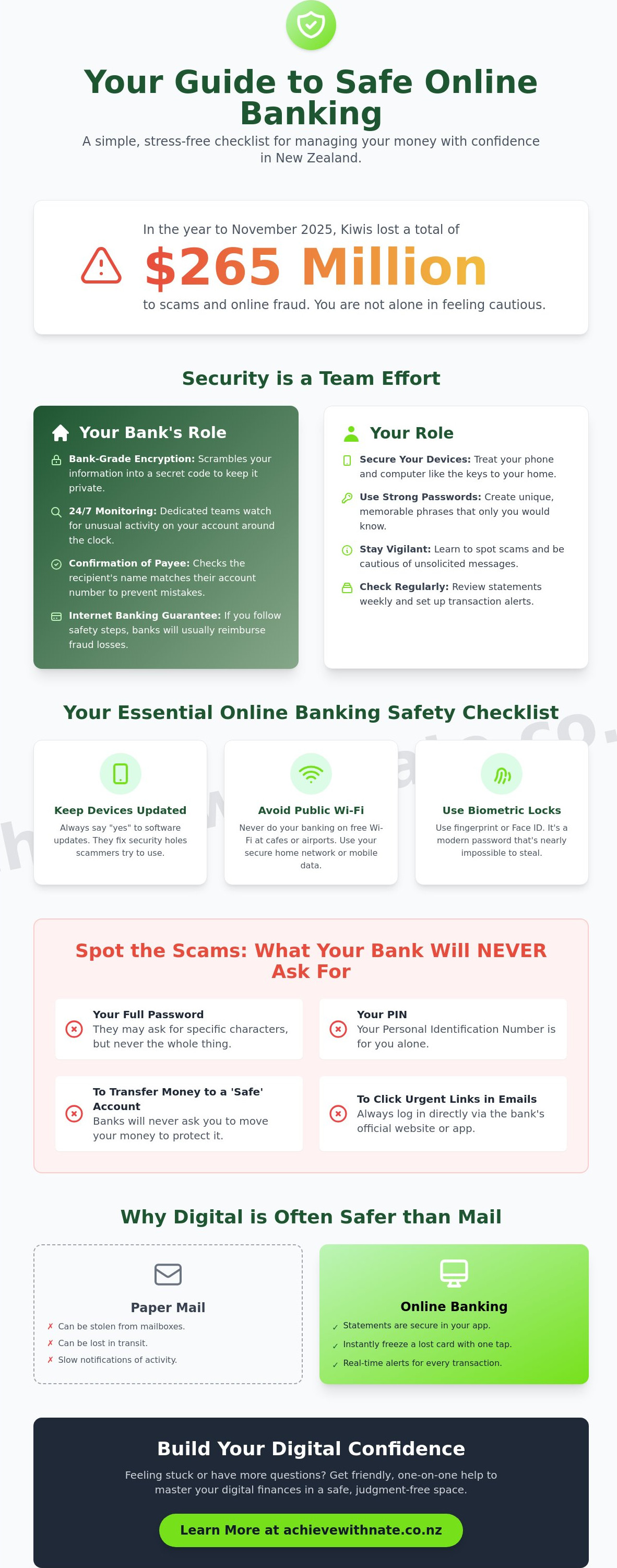
Imagine sitting down with your morning tea, opening your laptop to check your balance, and feeling a sudden wave of worry. You might wonder if you're about to click the wrong button or if those news reports about local bank scams could happen to you. It's a heavy feeling, and you aren't alone in it. Many Kiwis feel overwhelmed by technical talk and the fear of making a mistake. After all, New Zealanders lost a total of $265 million to fraud in the year leading up to November 2025. It's completely natural to feel cautious.
The good news is that protecting your money doesn't require you to become a tech expert. This guide is here to show you how to use online banking safely nz using a simple, stress-free checklist. We'll strip away the confusing jargon and replace it with total confidence and peace of mind. You'll learn exactly how to spot a fake bank email and how to create a gentle, secure routine for your digital finances. Let's take this one step at a time, so you can manage your money with a sense of control and ease.
Table of Contents
Understanding Online Banking Security in New Zealand
Think of online banking like a secure digital bridge. It connects your living room directly to your local bank branch without you ever needing to leave your favorite armchair. To keep this bridge safe, banks use something called "bank-grade encryption." This is just a fancy way of saying they scramble your information into a secret code that nobody else can read. It's one of the many Online banking security features designed to keep your private details private and your money where it belongs.
To better understand this concept, watch this helpful video:
When you're learning how to use online banking safely nz, it's helpful to view security as a team effort. It's a shared responsibility. Your bank builds the high-tech walls and monitors for trouble around the clock, while you hold the keys. Modern banking apps are made to be incredibly simple to use. They're built specifically so you can't accidentally "break" anything or send money into the void by mistake. Knowing you have a partner in this process can help turn that initial anxiety into a sense of calm control.
Why online banking is often safer than the mail
For a long time, we relied on paper statements arriving in the letterbox. However, paper can be easily taken from a mailbox or lost in the sorting process. Digital statements live safely inside your locked banking app where only you can see them. If you ever misplace your debit card, you don't have to wait for the bank to open on Monday morning. You can simply "freeze" the card instantly with one tap on your phone. You can also set up notifications that ping your phone the moment any money leaves your account, giving you an instant update that paper mail simply can't match.
The role of NZ banks in your protection
Banks across Aotearoa have your back with sophisticated tools. They employ dedicated teams who watch for unusual activity 24 hours a day. A service called "Confirmation of Payee" is now standard across major banks like ANZ, ASB, BNZ, Kiwibank, and Westpac. This tool checks that the name of the person you're paying matches their account number before the money is sent, which helps prevent those common "wrong button" mistakes. Most importantly, New Zealand banks offer an Internet Banking Guarantee. This means if someone accesses your account illegally and you've followed basic safety steps, the bank will usually reimburse your loss. You're never truly on your own in this digital world.
Securing Your 'Digital Branch': Your Device and Connection
Your smartphone or laptop is much more than a gadget. It is the physical key to your digital life. Just as you wouldn't leave your house keys on a park bench, your devices need a little bit of protection to stay secure. One of the best ways to keep your "digital branch" safe is to simply say "yes" to software updates. When your device asks to update, it is often fixing tiny security holes that scammers might try to use. It is a quick, easy way to keep your locks strong without needing to do any heavy lifting.
When you are out and about in Aotearoa, you might see "Free Wi-Fi" at a local cafe or the airport. While it is tempting to use, it isn't the best place for banking. Public Wi-Fi is like a shared conversation in a busy room; you never know who might be listening in. It is always better to wait until you are home or use your phone's own mobile data. This simple habit is a big part of how to use online banking safely nz. It ensures that your private financial information stays between you and your bank.
Many of us find it hard to remember long strings of numbers. This is where biometric locks, like your fingerprint or face ID, are so helpful. They turn your unique human features into a password that is almost impossible to steal. It is a gentle, modern way to stay safe without needing to remember a dozen different codes. If you ever feel a bit stuck with these settings, a little bit of One-on-One Digital Coaching can help you get everything set up exactly how you like it.
The power of a strong, unique password
It can be tempting to use a pet's name or a significant birthday as a password. However, these are often the first things a scammer will guess. A better approach is to use a short, memorable phrase that only makes sense to you. For example, "TheGreenHillIsHigh!" is much stronger than "Password123." If managing all these different logins feels a bit much, you might find that Device and Email Basics Training helps you feel more organized and at ease with your digital tools.
Two-Factor Authentication (2FA) made simple
You might have heard the term "Two-Factor Authentication" or 2FA. It sounds technical, but it is actually a very simple concept. It just means you need two things to get into your account: something you know (your password) and something you have (your phone). When you log in, your bank might send a quick text message code to your phone. This extra step is the single best way to stop someone else from getting into your money. Even if they somehow found your password, they wouldn't have your physical phone to finish the login. It provides a wonderful layer of protection that lets you bank with total peace of mind.
Spotting the Scams: What Your NZ Bank Will Never Ask You
Scammers don't just target computers; they target our emotions. They often use a trick called "false urgency" to make you feel like you must act immediately. You might get a call or a message saying your account has been "compromised" or that a large payment is pending. This is designed to make you panic and stop thinking clearly. When you feel that rush of anxiety, take a deep breath. A real bank will never pressure you into making a split-second decision over the phone or through a text message.
The golden rule of how to use online banking safely nz is simple. Your bank will never, under any circumstances, ask for your password, your PIN, or your login codes over the phone. If someone asks for these details, they are a scammer. It is that straightforward. Just hang up. You are not being rude; you are being safe. You can always call your bank back using the official number on the back of your debit card to check if the call was real.
Phishing emails are another common hurdle. These are fake emails that look like they come from your bank. They often use generic greetings like "Dear Customer" instead of your name. Have a look at the sender’s email address. If it looks like a jumble of random letters or doesn't end in the official bank website address, it is a fake. The same goes for text messages, often called "smishing." If a text contains a link and asks you to log in to "fix" a problem, delete it. Your bank won't send you links to login pages via text.
Spotting fake websites and links
When you want to do your banking, always type your bank's website address directly into the bar at the top of your browser. Never use a link from an email or a search result, as these can lead to "copycat" sites. Look for the little padlock icon next to the website address. This shows that the connection is secure. If the padlock is missing or your browser shows a warning, leave the site immediately. Taking these small, careful steps ensures you are always standing on solid ground.
The "Confirmation of Payee" safety net
New Zealand banks have recently introduced a helpful tool called "Confirmation of Payee." When you set up a new payment, the system checks if the name you've typed matches the name on the account number. If they don't match, you'll see a warning. This is a clear signal to stop and double-check. Don't be afraid to pick up the phone and call the person or business you are trying to pay. Use a number you already know is correct to verify their details. It's much better to spend two minutes checking than to send money to the wrong place. This simple routine is a cornerstone of how to use online banking safely nz.
Your Essential Online Banking Safety Checklist for 2026
Most of the advice you see online focuses on what the banks are doing to keep you safe. While their high-tech systems are vital, your own small habits are the most powerful tools you have. Real security isn't about being a computer whiz. It's about a few calm, consistent actions that fit right into your normal day. By following a simple routine, you can master how to use online banking safely nz without any of the usual stress or technical headaches.
One of the best things you can do is turn on transaction notifications in your banking app. This means every time money moves in or out of your account, your phone will give you a little ping. It's like having a friendly tap on the shoulder that keeps you informed in real time. Along with this, try to use your bank’s official app rather than a web browser on your phone. Apps are built as "secure containers" specifically for banking, which adds another layer of protection. When you're finished, always remember to log out. It’s a simple way to "lock the door" behind you.
Passwords are another area where a small change makes a big difference. It's vital to keep your banking password completely different from your email password. Think of it like having different keys for your car and your house; if you lose one, the other is still safe. If you'd like someone to walk through these settings with you in a patient, judgment-free way, my One-on-One Digital Coaching is here to help you feel completely at ease with your technology.
Daily and weekly habits
You don't need to spend hours checking your accounts. A quick scan of your recent transactions while you have your morning cuppa is plenty. This helps you stay familiar with your own spending patterns. Once a week, take a moment to delete old bank-related emails or those "temporary code" texts you've already used. They've done their job and don't need to clutter up your phone. Finally, ensure your phone’s "Find My Device" feature is turned on. If your phone ever goes missing, this tool helps you lock it from a distance, keeping your banking app safe from prying eyes.
What to do if something feels wrong
If you ever see a transaction you don't recognize or feel that something isn't quite right, trust your gut. Call your bank immediately using the official number found on the back of your debit or credit card. They are there to help and would much rather you call about a false alarm than stay silent. It's also helpful to understand the steps for reporting a cybercrime in New Zealand. If you suspect a virus on your computer, avoid using it for banking until it's been checked; instead, use a different "clean" device to change your passwords. Taking these manageable actions is the heart of how to use online banking safely nz.
Building Digital Confidence One Step at a Time
The world of technology moves at a dizzying speed. It often feels like every time you finally get comfortable with a button, it moves or changes its name. It is completely natural to feel a bit left behind. No, you don't have to keep up with every single update. You only need to master the parts that matter to your daily life. Learning how to use online banking safely nz is a personal journey, not a competitive race. It is perfectly okay to take your time and find your own rhythm.
Digital coaching provides a safe, quiet space to practice these skills without any of the usual stress. Imagine making your first online payment or setting up a recurring transfer with a patient mentor sitting right beside you. There is no pressure to "just know" how it works. Instead, we walk through each screen together. This kind of hands-on practice turns a task that once felt overwhelming into a simple, manageable habit. By taking these incremental steps, you can reclaim your peace of mind and feel truly at home in the digital world.
Personalized help for NZ seniors and beginners
Learning should be a warm, positive experience. My one-on-one digital coaching is designed to be a criticism-free zone where we focus on what you need. Whether you want to pay a local bill or set up an automatic payment for the grandkids, we go at your pace. There is no such thing as a "silly" question here. We focus on practical skills that make your life easier and your banking more secure. It is about building confidence, one click at a time.
Your next steps toward tech independence
If you are ready to feel more in control, I would love to chat. You can start with a complimentary introductory consultation to see if coaching feels right for you. Beyond banking, there are many ways to get connected in Aotearoa. You might find a guide on RealMe account setup helpful for managing other parts of your life online. Remember, you are the one in the driver's seat. With a little bit of guidance and some steady practice, you can use technology with total independence. Taking small, manageable actions today is the best way to master how to use online banking safely nz and secure your digital future.
Your Path to Digital Independence
If you still feel a bit of a flutter in your chest when you open your banking app, that's completely okay. You don't have to figure this out alone. The Achieve With Nate Movement provides specialized support for NZ seniors and small businesses who want to master their devices without any technical jargon. As a patient, non-judgmental technology mentor, I offer a no-stress, plain-language approach to help you move from feeling overwhelmed to feeling truly empowered. You can book a patient, one-on-one digital coaching session with the Achieve With Nate Movement to practice these skills at your own pace. Let's work together to build your confidence so you can handle your finances with total ease. Every big change starts with one small, steady step forward.
Frequently Asked Questions
Is it safer to use a banking app or a web browser on my computer?
Using the official banking app on your phone or tablet is generally the safer choice. Apps are built as secure, self-contained environments that are much harder for scammers to interfere with than a standard web browser. When you use an app, you also remove the risk of accidentally typing your bank's address incorrectly and ending up on a fake "copycat" website. It is a simple way to practice how to use online banking safely nz every day.
What should I do if I accidentally clicked a link in a suspicious email?
If you click a suspicious link, don't panic, but do act quickly. Close the page immediately without typing any information or logging in. Your next step is to call your bank using the official number on the back of your debit card. They can check your account for any unusual activity and help you change your login details if you're worried. It is always better to be extra cautious and have the bank take a quick look.
Does my NZ bank ever call me to ask for a verification code?
No, a New Zealand bank will never call you to ask for a verification code, your password, or your PIN. Those codes are for your eyes only and act like a second key to your account. If someone calls claiming to be from your bank and asks for a code that was just sent to your phone, hang up immediately. This is a common trick used by scammers to try and bypass your security settings.
Is public Wi-Fi really that dangerous for online banking?
Public Wi-Fi in cafes or airports can be risky because these connections aren't always private. It's best to avoid doing your banking on these open networks where others might be able to see your digital traffic. Instead, wait until you're back on your secure home Wi-Fi or use your phone’s own mobile data. This small habit keeps your connection private and ensures your financial information stays between you and your bank.
What is the "Confirmation of Payee" service I keep seeing?
Confirmation of Payee is a helpful safety check that verifies the name of the person or business you're paying. It checks that the name you've entered matches the account number at the other bank before you hit send. Most major NZ banks began rolling this out in late 2024 to help prevent mistakes and scams. If you see a mismatch warning, it's a signal to stop and double-check the details with the person you're paying.
How often should I change my online banking password?
You don't need to change your password on a set schedule if it is strong, unique, and kept private. It is much more important to use a password that nobody can guess and to keep two-factor authentication (2FA) turned on. You should only change your password if you suspect someone else might have seen it or if you've used that same password on another website that has had a security issue. Quality is better than frequency.
Can I bank safely on my tablet or iPad?
Yes, you can bank safely on a tablet or iPad as long as you use the official banking app. Tablets are wonderful for banking because the larger screen makes it easier to see your transactions clearly. Just make sure your tablet's software is up to date and that you're using a secure internet connection. Following these steps is a great way to manage your money with confidence on a device you're comfortable with.
What is the best way to store my banking passwords safely?
The safest way to store passwords is in a secure password manager or a physical notebook kept in a safe place at home. Never save your banking password in a document on your computer or in a simple note on your phone, as these are easy for others to find. Keeping your login details in a secure, separate place is a key part of how to use online banking safely nz and helps you stay organized without the stress of forgetting your codes.

Comments