Learn AI Tools NZ: A Gentle, Stress-Free Guide for Absolute Beginners (2026)
- kxnath
- 21 hours ago
- 13 min read
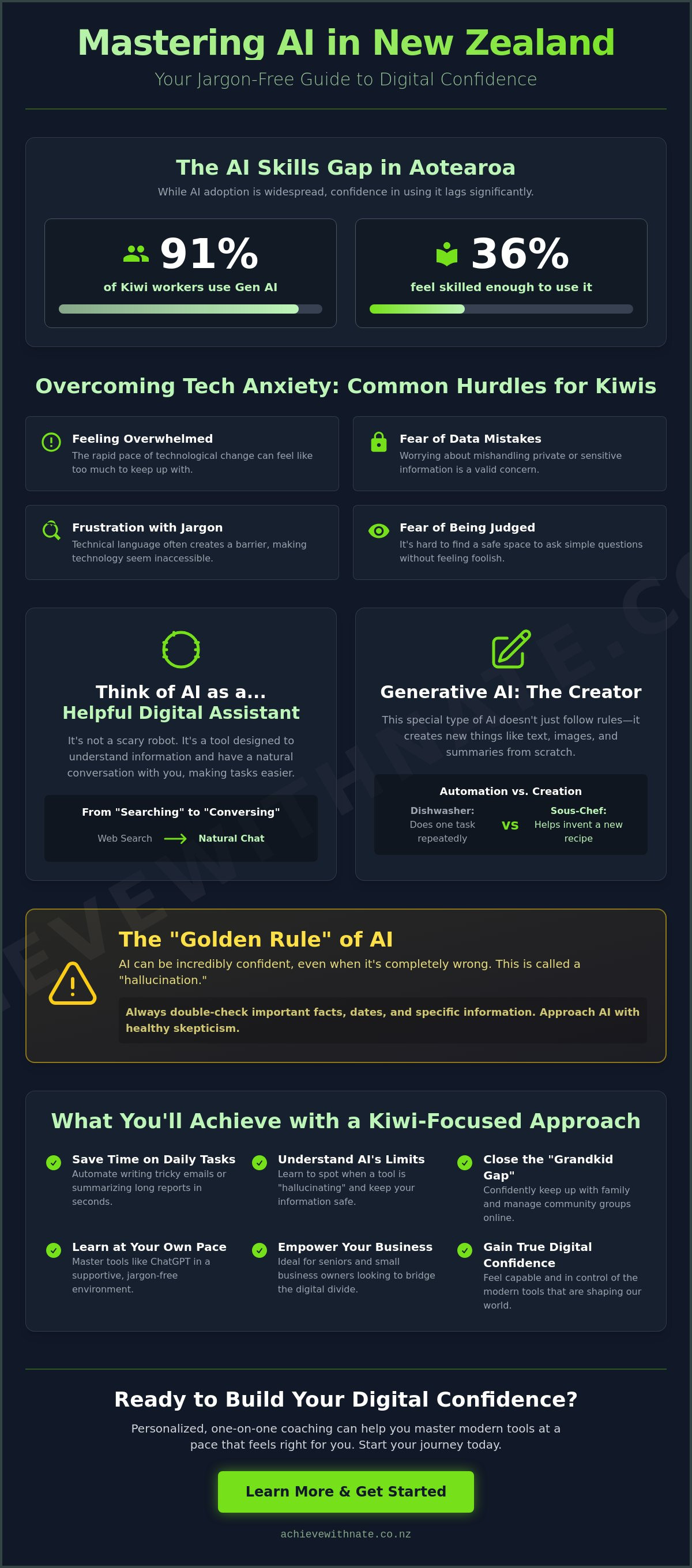
Did you know that 91% of Kiwi workers are already using generative AI to some extent, yet only 36% of us feel like we actually have the skills to use it? If you want to learn AI tools NZ style, you're certainly not alone in feeling a bit behind the curve. It's completely normal to feel overwhelmed by how fast things are changing. You might worry about making a mistake with your data or feel frustrated by all the tech-bro jargon that seems to fill every news headline lately. It's hard to find a space where you can ask a simple question without feeling judged.
We believe that technology should serve you, not the other way around. This guide is here to help you master these modern tools at your own pace with a patient, Kiwi-focused approach that prioritizes your confidence. You'll discover how to use ChatGPT to save time on daily emails, understand exactly what these tools can and cannot do, and finally feel digitally confident right here in Aotearoa. Let's take a slow, steady look at how these tools can make your life easier without the stress.
Key Takeaways
Think of AI as a helpful digital assistant that replaces frustrating web searches with simple, natural conversations.
Discover how to learn AI tools NZ style by giving "prompts" just like you'd give clear directions to a friendly neighbor.
Master the "Golden Rule" of technology to keep your private information safe while learning to spot when a tool is being a bit too confident.
Close the "Grandkid Gap" by building your own digital confidence in a supportive, jargon-free environment where every question is welcome.
See how personalized, one-on-one coaching can help you use tools like ChatGPT and Microsoft Copilot at a pace that feels right for you.
Table of Contents
What is AI and How is it Changing Life in New Zealand?
When you hear the term Artificial Intelligence, you might picture a shiny robot from a movie. It feels cold and a bit scary. But in reality, it's much simpler. Think of it as a digital helper that lives on your phone or computer. It doesn't have feelings or a soul. It's just very good at looking at information and helping you make sense of it. To get a better handle on the basics, it helps to understand what artificial intelligence is from a historical perspective. It's not about machines taking over; it's about machines helping us do things faster.
The biggest change for us in Aotearoa is how we use our devices. For years, we've "searched" the web by typing in keywords and clicking through lists. Now, we're moving toward having a conversation. You can ask your computer a question just like you'd ask a friend. "How do I fix a leaky tap?" or "Can you help me write a nice thank you note?" The computer understands the context and gives you a direct answer. You're likely already using this tech without even realizing it. Every time Netflix suggests a show you might like, or Google Maps finds a faster route through Auckland traffic, a little bit of AI is working in the background to make your life smoother.
To better understand how these systems learn to help us, watch this helpful video:
Generative AI: The tool that creates
Generative AI is a special kind of helper. Most tech just follows a set of rules. Generative tools actually make things from scratch. They can write a poem, create an image of a beach in Piha, or summarize a long report for you. In 2026, these tools are becoming a standard part of every household. It isn't just about automation, which is doing the same task over and over. It's about creation. It's the difference between a dishwasher, which is automation, and a sous-chef who helps you invent a new recipe, which is generative AI. This makes it much more accessible for everyone, regardless of their technical background.
Why learning AI tools in NZ matters now
You might feel like you can just ignore this, but research shows that 91% of Kiwi workers are already using these tools. If you want to learn AI tools NZ experts recommend, it's really about staying connected. It helps you keep up with your grandkids or manage a local community group. For seniors and small business owners, this technology can bridge the digital divide. It makes daily life easier. Imagine planning a trip to Rotorua and having a tool suggest the best local spots based on your specific interests. Or writing a tricky email to the council without staring at a blank screen for an hour. Working with a digital confidence coach NZ can make this transition feel like a walk on the beach rather than a climb up a mountain. Taking small, manageable steps today ensures you won't feel left behind as the world moves forward.
The Building Blocks: Prompts, Privacy, and Practicality
Starting your journey to learn AI tools NZ style begins with understanding one simple truth. AI is a helpful assistant, but it isn't perfect. We often call this the "Golden Rule" of artificial intelligence. These tools can be incredibly confident even when they are completely wrong. In the tech world, this is known as a "hallucination." It's like having a friend who tells a tall tale with such a straight face that you almost believe them. Always double-check the facts, especially if you're asking for specific dates or local Kiwi history. When you approach AI with a healthy dose of curiosity and a little bit of skepticism, you're already ahead of the game.
Learning how to use these helpers effectively doesn't require a degree in computer science. It just takes a bit of practice and a shift in how you think about your computer. Instead of seeing it as a machine that needs rigid commands, think of it as a neighbor you're asking for a favor. If you're looking for more details on how our country is managing these new technologies, you can explore New Zealand's Public Service AI Framework for a broader view of the national strategy.
How to talk to an AI: Prompting for beginners
A "prompt" is simply the instruction you give to the AI. Think of it as giving directions to a helpful neighbor. If you just say "make food," they won't know where to start. But if you give them a bit of context, a specific task, and a format, they can work wonders. We call this the CTF framework. For example, instead of just asking for a recipe, try this. "I am a busy parent (Context). Please create a five-day meal plan using seasonal NZ produce (Task). Put it in a simple bullet-point list (Format)." This small change makes the results much more useful. Never feel silly for how you phrase things. The AI doesn't judge. It's there to listen and learn alongside you.
Keeping your data safe in Aotearoa
Privacy is a top priority for many of us. In fact, 62% of New Zealanders say they would stop using a service if they had concerns about how their data was being handled. While New Zealand doesn't have a specific "AI Act" yet, we are protected by the Privacy Act 2020. This law ensures that organizations handle your personal information with care. When you use free AI tools, the basic rule is simple. Don't share anything you wouldn't want on a public noticeboard. Avoid typing in bank details, passwords, or private health information. Many businesses use "business-grade" versions of these tools which offer much higher security, but for home use, just being cautious is your best defense. You can find more tips on the Privacy implications of using AI tools in NZ on our blog. Taking these small, safe steps helps you build a digital world that feels secure and supportive.
Overcoming Tech Anxiety: Why You Don’t Need to Be a "Techie"
Feeling a bit overwhelmed by the rush of new technology isn't a sign that you're falling behind. It's actually a completely normal and valid response. When things change this quickly, it's natural to feel a sense of hesitation. In fact, while almost everyone in Aotearoa has heard of AI, only about 34% of us feel we can clearly explain what it actually is. If you feel a bit lost, you are in the majority. You don't need to be a computer whiz to learn AI tools NZ style. You just need a little bit of patience and a safe space to ask the questions that might feel silly, but are actually very important.
Many of us fall into what we call the "Grandkid Gap." This is when you rely on a younger family member to fix a digital problem or show you how an app works. They often move so fast that you don't actually learn the skill yourself. It leaves you feeling capable in the moment, but stuck the next time a problem pops up. Building your own skills isn't just about the tech itself. It's about regaining your independence. It's about being able to send that email, plan that trip, or organize those photos without having to wait for someone else to have a free minute to help you.
Beyond just convenience, these tools are becoming incredible helpers for accessibility. If you struggle with dyslexia, AI can check your writing for clarity without the stress of a traditional spellchecker. If you have physical limitations that make typing difficult, voice-to-text tools have become remarkably accurate. Nate’s philosophy is simple. We take small, incremental steps. We don't try to master everything in one afternoon. Instead, we focus on one manageable action at a time. This approach turns a mountain of "scary" tech into a series of simple, successful moments.
Busting the common AI myths
One of the biggest hurdles is the belief that you might be "too old" to learn this. The reality is quite the opposite. AI is actually the most "human-readable" technology we've ever seen because you talk to it in plain English. You don't need to learn code; you just need to have a chat. Another common fear is that AI is only for big corporations or high-tech jobs. However, research into AI applications and innovation in New Zealand shows it's being used in everything from agriculture to local community projects. It's a tool designed to reduce your daily stress, not add to it.
Building your digital confidence slowly
The best way to start is with "low-stakes" tasks. You might begin with something creative, like using AI for content creation NZ to help write a newsletter for your local club. There is immense power in being in an environment where you can say, "I don't know, can you explain that again?" without any judgment. A coach acts as a bridge. They help you translate the complicated terms into neighborly advice. By starting slow, you ensure that the foundation of your knowledge is solid. You'll find that once you understand the basics, the rest of the digital world starts to look a lot less intimidating.
Simple AI Tools to Start With Today (A Kiwi Beginner’s Toolkit)
Opening a new piece of software can feel like looking at the dashboard of a spaceship. There are too many buttons and you don't want to break anything. The good news is that most AI tools today are designed to be as simple as sending a text message. You don't need to install complicated programs or learn a new language. You just need to know which tool fits your specific needs. When you begin to learn AI tools NZ style, it's best to start with one or two reliable options that make your daily life easier right away.
ChatGPT is the most famous all-rounder. It's perfect for writing letters, planning meals, or just brainstorming ideas for a birthday present. If you already spend a lot of time in Word or Excel, Microsoft Copilot might be your best friend. It lives right inside the programs you already use. For those who live in their Gmail inbox, Google Gemini is a great alternative that helps you manage your messages. If you find it hard to keep up with community board meetings or local club catch-ups, you can explore how to use AI to summarize meetings. These tools act like a digital secretary who never gets tired.
Choosing your first AI tool
We usually recommend ChatGPT as the "front door" for beginners. It has a very clean interface that feels like a simple chat window. You don't need to worry about a paid subscription yet. The free versions of these tools are incredibly powerful and more than enough for most people starting out. When you set up your first account, just use a strong password and remember the privacy rules we talked about earlier. Keep it simple. You can always explore the fancy features later once you feel more at home.
Practical "First Steps" for Kiwis
The best way to build confidence is by doing. Try these three low-stakes tasks this week:
Summarise the news: Copy a long article about New Zealand politics and ask the AI to "give me the three main points in plain English."
Draft a polite email: Ask the AI to "write a friendly email to a tradesperson asking for a quote on a new fence, making sure to mention I'm on a budget."
Plan a local trip: Tell the AI, "I have friends visiting Christchurch for the weekend. Can you suggest a relaxed itinerary that includes a nice walk and a quiet cafe?"
If you'd like someone to sit beside you while you try these steps for the first time, our one-on-one digital coaching is the perfect way to find your footing without the stress. We can walk through these tools together at a pace that feels comfortable for you.
Personalized AI Coaching: Finding Your Digital Confidence with Nate
Many people try to start their journey by watching pre-recorded videos or sitting in a crowded classroom. These methods often fail because they move too fast or don't let you ask the questions that feel personal to you. When you want to learn AI tools NZ style, you deserve a mentor who understands your specific pace. One-on-one coaching is different. It's a conversation, not a lecture. We focus on your screen, your devices, and your specific goals. You aren't just a number in a database; you're a neighbor looking to build a new skill.
The Achieve With Nate approach is built on neighborly kindness and profound empathy. We don't believe in high-pressure environments. Instead, we offer a supportive companion to walk beside you as you explore this new world. We only focus on the tools you actually need. If you don't need complex business automation, we won't waste your time on it. We'll stick to the practical things that make your life better and your days less stressful. While formal university courses might focus on theory, we focus on you.
What to expect in an AI coaching session
Expect a calm, criticism-free environment where your well-being comes first. You can ask the same question ten times if you need to; we have all the time in the world. We work on your own laptop, tablet, or phone so that everything feels familiar. The goal is to create practical workflows that save you time immediately. You won't just learn about the tech. You'll leave with a skill you can use as soon as we finish. Whether it's organizing club newsletters or managing a busy family calendar, we make the tech work for your life.
Taking the next step without the stress
Getting started is simple and low-stakes. You can fill out an Expression of Interest to tell us about your digital goals. We offer a "No-Stress Guarantee," which means we learn at your own pace, no matter how long it takes. There's no rush and no judgment here. You're also invited to join the Achieve With Nate Movement to connect with others who are finding their footing. It's truly the most supportive way to learn AI tools NZ residents can trust. Technology shouldn't be a burden. Let's work together to make it your new superpower through small, manageable, and incremental actions.
Step Into Your Digital Future with Confidence
Technology is moving fast, but you don't have to sprint to keep up. We've explored how AI is simply a digital assistant designed to make your life in New Zealand a little easier. From understanding the basics of privacy to trying out your first prompt in ChatGPT, you've already taken the most important steps. You've seen that you don't need to be a computer expert to feel confident in this new digital landscape. It's about making the tools work for you, not the other way around.
If you're ready to learn AI tools NZ at your own pace, we are here to support you. You don't have to do this alone or feel frustrated by complicated jargon. Nate provides personalized, patient coaching for Kiwis that focuses on your digital confidence and stress reduction. There's no judgment and no rush; just practical help for your real life. We focus on the things that actually matter to you.
Book a gentle one-on-one digital coaching session with Nate today and start turning technology into your superpower. Remember that every expert was once a beginner. The best way to move forward is by taking small, incremental, and manageable actions. You've got this.
Frequently Asked Questions
Is AI free to use for people in New Zealand?
Yes, most of the popular tools like ChatGPT, Google Gemini, and Microsoft Copilot offer very capable free versions. You don't need to pay for a subscription to start learning the basics. While there are paid "Pro" versions with extra features, the free options are more than enough for everyday tasks like writing emails or planning a local community event.
Do I need a fancy computer to learn AI tools?
No, you don't need a high-end machine or a brand-new laptop to get started. These tools run in your internet browser or through a simple app. The heavy lifting happens on the tool's own servers, not on your device. As long as your computer, tablet, or smartphone can connect to the internet, you have everything you need to begin.
How can AI help my small NZ business if I am a solo operator?
AI acts like a free assistant that handles time-consuming administrative tasks. It can help you draft professional quotes, respond to customer inquiries, or brainstorm social media ideas for your local area. Research shows that 91% of Kiwi workers use generative AI to some extent, often to save hours each week on repetitive writing and planning tasks.
Is it safe to put my business data into ChatGPT?
You should treat the free version of ChatGPT like a public noticeboard. Avoid entering sensitive details like bank account numbers, passwords, or private client information. While the Privacy Act 2020 protects your rights in Aotearoa, the best practice for beginners is to keep your data anonymous. Focus on general tasks until you understand the specific security settings of each tool.
What is the best way to start learning AI if I am a senior?
The best way to learn AI tools NZ style is to focus on one practical, low-stakes task at a time. Start with something fun, like asking an AI to help you write a story for your grandkids or plan a vegetable garden. Avoid trying to learn everything at once. Small, manageable actions build confidence much faster than reading a dense technical manual.
Can Nate help me set up AI tools on my specific phone or laptop?
Yes, Nate offers one-on-one digital coaching that is completely hands-on with your specific devices. We can sit down together and set up your accounts on your own laptop, tablet, or phone. This ensures that you feel comfortable using the tools in your own digital environment. You won't have to deal with the pressure or pace of a crowded classroom.
How long does it take to become "confident" with AI?
Most people feel a significant boost in confidence after just one or two personalized sessions. Because you talk to AI in plain English, there isn't a complex new language to learn. Once you understand the basic rule of checking for hallucinations and how to phrase a simple prompt, you'll feel much more in control of the technology.
Are there any NZ-based AI workshops for beginners?
While there are various seminars available, many are quite formal or academic in nature. If you want to learn AI tools NZ in a way that feels supportive and jargon-free, personalized coaching is often a better fit than a generic workshop. It allows you to ask the specific questions that matter to your life in a criticism-free space.

Comments