


Personal Technology Audit NZ: A Gentle Checklist to Reclaim Your Digital Life in 2026

What if the most helpful update for your phone this year isn't a new app, but a quiet afternoon spent clearing the digital clutter? It's completely normal to feel a little behind when technology moves so fast. With new privacy rules like IPP 3A now in effect across New Zealand, many of us feel a lingering anxiety about where our data goes or whether our old devices are still safe. You might even find yourself paying for monthly subscriptions you haven't opened in a year.
Taking the time for a personal technology audit nz is a simple way to reclaim your time and your headspace. This isn't about being a tech expert; it's about making sure your tools are working for you, not the other way around. You deserve to feel confident and calm every time you open your laptop or check your phone.
In this guide, we'll walk through a gentle, step-by-step checklist. You'll learn how to identify which apps to keep, how to navigate rising e-waste fees in districts like Marlborough or Hauraki, and how to finally restore your digital peace of mind without any of the stress.
Key Takeaways
Understand why a personal technology audit nz is a gentle wellness check for your digital life, not a scary technical inspection.
Discover how to clear out your digital cupboard by identifying unused subscriptions and checking if your current hardware is still serving you well.
Find out how to use a Kiwi-sized approach to manage local essentials like RealMe without the complexity of corporate IT solutions.
Get a manageable 30-minute checklist for your next Sunday afternoon to tidy your devices and updates without feeling overwhelmed.
Learn the 'one thing' rule to prioritise your digital tasks and handle tech surprises without any of the stress.
Table of Contents
What is a Personal Technology Audit (and Why It Isn't Scary)?
For most of us, the word "audit" feels like a knock on the door from the IRD. It sounds cold, formal, and a bit stressful. But a personal technology audit nz is actually the opposite. It is a warm, quiet moment to breathe and look at your devices with fresh eyes. It is simply a way to make sure your digital tools are helping you live your best life, rather than making it harder.
Think of it as a digital stocktake for your home. While big companies use IT assessments to find security holes or save millions, your personal setup is different. You don't need a team of experts with clipboards. You just need a little space to decide what stays and what goes. This isn't about being "high-tech." It is about being human and making sure your tools serve you.
To better understand this concept, watch this helpful video:
A quick review often reveals small leaks in your budget. Maybe it's a streaming service you forgot to cancel or an old cloud storage plan you no longer need. These small costs add up over a year. More importantly, an audit stops you from wasting time on updates for apps you never even open. It clears the path so you can focus on the tasks that actually matter to you.
Identifying Your Digital 'Heavy Lifters'
When you start a personal technology audit nz, you begin by looking at your heavy lifters. Most of us only use three or four tools every single day. Perhaps it's your email, a banking app, and a way to message the grandkids. We often get distracted by the "tech" itself, but a good audit focuses on the "task." If your phone and laptop aren't talking to each other, you end up doing double the work. We want your tools to work together so you can get back to what matters most. By focusing on these core tools, the rest of the digital noise just fades away.
The Emotional Benefit of Digital Clarity
There is a heavy weight that comes with "tech-anxiety." It’s that nagging feeling that you’re doing something wrong or missing an update. When you clear that away, you gain digital confidence. You stop being a servant to your screen and start feeling in control again. An organised digital life creates more time for offline moments, like a walk on the beach or a coffee with a friend. A personal audit is a way to reclaim 5 hours of your week.
The Three Pillars of a Calm Digital Setup
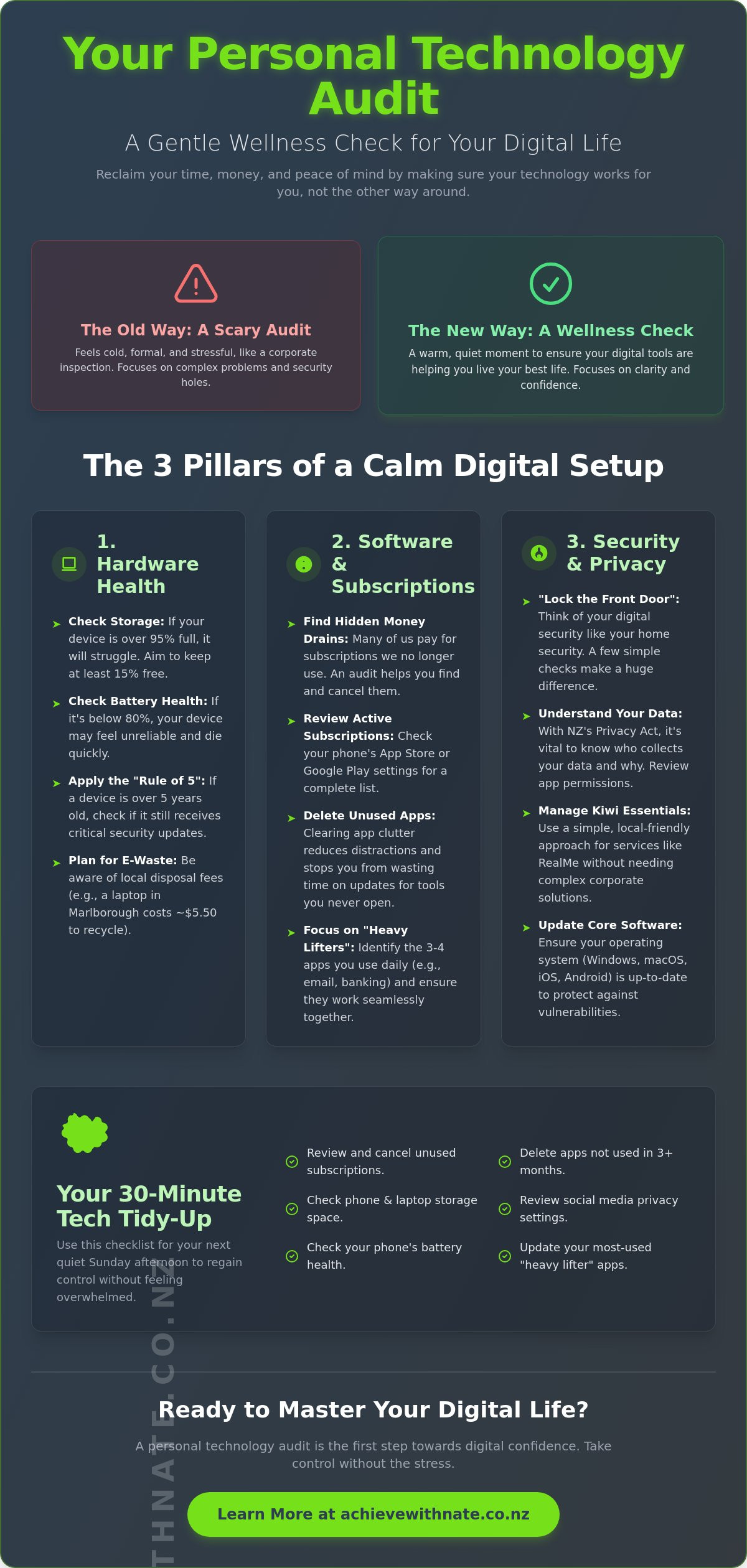
Building a calm digital life doesn't happen by accident. It starts with a solid foundation. When we look at a personal technology audit nz, we focus on three simple pillars that keep everything upright and stress-free. These pillars are the heart of what a digital confidence coach NZ helps you master. They turn that heavy feeling of having too much tech into a sense of quiet control.
The first pillar is hardware health. We look at the physical tools you hold in your hands. The second pillar is your software and subscriptions. This is like cleaning out the digital cupboard to see what is actually being used. Finally, the third pillar is security and privacy. We think of this as the "lock the front door" approach. With the Privacy Amendment Act and Principle 3A now in place as of May 1, 2026, knowing who collects your data is more important than ever. It's about making sure your digital home is as safe as your physical one.
Hardware: Is It Time for an Upgrade or a Clean?
Sometimes a slow laptop isn't broken. It might just have a "digital dust" problem. Check the storage on your iPhone or Android. If your memory is 95% full, your phone will struggle to breathe. You should also check your battery health in your settings. If it's below 80%, that might be why your phone feels unreliable. We use the "Rule of 5" here. If your device is older than five years, it's worth checking if it can still run the latest security updates. If you do decide to move on, remember that e-waste fees have changed. In the Marlborough District, the fee for a laptop is now $5.50 as of July 1, 2026. Knowing these small details helps you plan without any surprises.
Subscriptions: The Hidden Money Drain
It's easy to sign up for a free trial and forget about it. A personal technology audit nz helps you find every app taking money from your bank account. Go into your phone settings and look at your active subscriptions. Ask yourself the "Joy Check" question: Does this app actually make my day easier? If it doesn't, it's okay to let it go. Cancelling these services shouldn't be a source of stress. It's just about making sure your hard-earned NZD stays where it belongs. If you feel stuck on where to start, you might find a bit of extra support through one-on-one digital coaching makes the process much lighter.
Personal vs. Corporate IT Audits: Finding the Right Fit
When you hear the term "IT audit," you might picture a team of engineers in a server room checking miles of cables. For a big corporation, that makes sense. But for an everyday Kiwi or a sole trader, that approach is like using a sledgehammer to crack a nut. You don't need a heavy technical report filled with graphs and risk assessments. A personal technology audit nz is designed to be "Kiwi-sized." It focuses on the tools you actually touch, like your banking app, your email, and how you access government services.
A common worry is thinking, "I'm too small for a technology audit." You might feel that because you don't have a big office or a staff of ten, your setup doesn't matter. The truth is that even a one-person office or a busy home deserves to run smoothly. This is where business workflow optimization comes in. It isn't just for big firms; it's about making your specific daily routine feel lighter. Whether you are managing a small side-hustle or just your family's busy schedule, having your tech in order saves you from those "pukana" moments of total surprise and stress.
Why Jargon-Free Support Matters
Corporate IT support often fails because it speaks a different language. You don't need to understand "back-end architecture" to send an invoice or clear your inbox. You need to know what a specific button does and why it matters for your day. A good audit feels more like a conversation with a patient mentor than reading a technical manual. It’s about gaining the confidence to use your tools without fear. We focus on practical, actionable steps that make sense for your life, not a list of industry buzzwords that leave you feeling more confused than when you started.
Local NZ Context: RealMe, IRD, and Banking
Our digital lives in Aotearoa are unique. We rely on specific services like RealMe to prove who we are and Xero to keep our books tidy. A personal technology audit nz ensures these essential local services are set up correctly and safely. Because we live in a smaller market, we also face specific scams that target New Zealanders. Having a local "tech buddy" means you get advice that understands our local banking systems and government requirements. It’s about building a digital home that is secure, familiar, and easy to manage right here at home.
Your 2026 Personal Tech Audit Checklist
You don't need a whole weekend to get your digital life in order. A quiet Sunday afternoon is the perfect time for a gentle reset. By spending just thirty minutes on a personal technology audit nz, you can clear the digital cobwebs that make your devices feel heavy. It is about creating a fresh start so your Monday morning feels lighter and more focused. We want to move away from the noise of 2025 and make sure your tools are ready for the year ahead.
Start with your physical devices. Give your phone and laptop a gentle clean with a soft cloth. Then, check for any pending software updates. These updates aren't just about new features; they often include vital security patches that keep your information safe. While you wait, look at your storage. If your photos are filling up your phone, check where they are actually going. Are they syncing to a cloud service you can access, or are they stuck on a device that might fail? Knowing your memories are safe provides a wonderful sense of relief.
The 10-Point Quick Check
This list is designed to be manageable. You don't have to do everything at once. Pick a few items and see how much better you feel. A great starting point for any personal technology audit nz includes these essentials:
Verify that 'Find My Device' or 'Find My iPhone' is active on your phone so you can locate it if it goes missing.
Scroll through your apps and delete any 'dead' tools you haven't opened in the last six months.
Check your backup solution to ensure your precious files are safe if your laptop suddenly dies.
Unsubscribe from three email newsletters that no longer interest you.
Turn on two-factor authentication for your primary email and banking accounts.
Small Business Add-ons
If you run a local business, your tech needs are a bit more specific. Take a moment to look at your client onboarding process. Is it simple for your customers, or is there too much back-and-forth? You can learn how to automate client onboarding NZ to remove those friction points. Check your Xero or invoicing flow as well. If you find yourself doing the same manual task every week, there is likely a simpler way to handle it. Making these small adjustments now saves you hours of frustration later in the month.
If this list feels a little daunting, remember you don't have to do it alone. A bit of one-on-one digital coaching can help you tick off these items with confidence and ease.
Taking the Next Step Without the Stress
You have looked at the checklist. You might feel like there is a lot to do. That is okay. The secret to a successful personal technology audit nz is the 'one thing' rule. You don't need to fix every single app or device today. Just pick one task. Maybe you just want to clear your desktop icons. Perhaps you only want to check your phone's battery health. That is a wonderful start. Small steps lead to big changes in how you feel about your tools.
Look at your results and think about what causes the most 'pukana' or surprise-stress in your day. If your slow laptop makes you want to walk away from your desk, start there. If you feel a pinch of anxiety every time you see your unread emails, make that your priority. Focus on the one area that will give you the most peace of mind once it is sorted. You are in control of the pace. There is no rush and there are certainly no tests to pass.
Technology is just a tool. It should never be the boss of you. Achieve With Nate Movement is always about people first and software second. It is about how you feel when you sit down to work or connect with family. Having a second pair of eyes can make the scary parts of tech feel much smaller. When you share the load, the stress tends to evaporate. You soon realize that most problems have a very simple fix. It is just about finding the right path forward with a supportive companion who understands your goals.
One-on-One Support for Your Results
Sometimes, an item on your checklist stays in the "too hard" basket for weeks. We all have those tasks that we keep putting off. Achieve With Nate Movement helps you tick off those stubborn items without any judgment or pressure. Think of it as having a patient, tech-savvy neighbor sitting right next to you. You can move at your own speed and ask any question you like. If you are ready to clear the digital clutter, you can fill out a simple Expression of Interest to start a low-pressure conversation about your needs.
Staying Confident in a Changing World
The digital world won't stop moving, but you can learn to walk through it calmly. Regular 'micro-audits' are the key. Spending just five minutes once a month ensures that your personal technology audit nz stays current. These quick checks prevent that big feeling of overwhelm from ever coming back. They are a gift to your future self. Over time, your digital life will start to feel as comfortable as an old pair of jandals. You will know where everything is. You will know your information is safe. Most importantly, you will have the confidence to keep taking those manageable, incremental actions that protect your peace of mind.
Ready to Reclaim Your Digital Peace?
You now have the tools to look at your devices with fresh eyes. We have explored how a simple checklist can clear out the noise of 2025 and why the three pillars of digital health matter for your peace of mind. You don't need to be a tech expert to feel in control. A personal technology audit nz is simply a gentle way to make sure your tools are working for you, not the other way around.
If you feel like you need a supportive companion to walk through these steps, help is right here. Nate provides patient, non-judgmental coaching that is 100% focused on New Zealand small businesses and seniors. You can enjoy a jargon-free environment where your comfort is the priority. Ready for a stress-free digital life? Fill out an Expression of Interest for a personal audit today.
You deserve a digital life that feels as comfortable as a quiet afternoon at home. Take a breath and remember that no matter how fast things change, you can find your footing. Focus on taking just one manageable, incremental action today.
Frequently Asked Questions
How often should I do a personal technology audit in NZ?
You should aim to do a personal technology audit nz once or twice a year. This helps you stay on top of software updates and unexpected subscription costs. A regular check-in ensures your devices don't become cluttered or slow over time. It's like a seasonal tidy-up for your digital life that prevents small issues from turning into big, stressful problems later on. It keeps everything running smoothly.
Do I need to be a 'tech expert' to audit my own devices?
You don't need to be a tech expert at all to review your setup. A personal technology audit nz is about your comfort and your daily needs, not technical specifications. If you can use your phone or laptop for basic tasks, you can review how they are serving you. It is more about looking at your habits and clearing out what you don't use anymore. It's a very human process.
What is the most important part of a personal tech audit?
Your emotional well-being and peace of mind are the most important parts of this process. While checking for security updates is vital, the ultimate goal is making sure you feel confident and calm. If a tool makes you feel frustrated or anxious, it simply isn't working for you. An audit helps you identify those pain points so you can simplify your digital world and reclaim your valuable time for offline moments.
Can a technology audit help me save money on my monthly bills?
Yes, an audit is a fantastic way to lower your monthly expenses and save money. Most of us have at least one or two monthly subscriptions we have forgotten about or no longer use. By looking closely at your bank statements and app store history, you can find and cancel these hidden costs. Over a year, these small monthly amounts can add up to hundreds of New Zealand Dollars back in your pocket.
What should I do if I find out my tech is completely out of date?
Start by checking if your device can still receive vital security updates from the manufacturer. If it's older than five years, it might be time to plan for a gentle upgrade. Remember that e-waste disposal fees in districts like Hauraki or Marlborough have specific rates as of 2026. For example, disposing of a laptop in Marlborough now costs $5.50. This helps you plan your next steps without any financial surprises.
How long does a typical personal technology audit take?
A typical audit usually takes between 30 and 60 minutes to complete. You don't have to do everything in one sitting if that feels like too much. You can spend fifteen minutes on your phone today and another fifteen minutes on your laptop tomorrow. The goal is to make it a manageable part of your routine rather than a chore that feels like a heavy burden on your Sunday afternoon.
Is my data safe during an audit with a coach like Nate?
Your personal information and data stay entirely under your control during the entire process. Coaching is about empowering you to manage your own tools, not taking over your devices or viewing your private files. You remain in the driver's seat at all times. A professional coach provides guidance and support in a non-judgmental way, ensuring you feel safe, respected, and heard while you learn to navigate your digital world.
What are the specific NZ security risks I should look for in 2026?
Be aware of scams that specifically target our local banking systems and services like RealMe. With the Privacy Amendment Act update from May 1, 2026, it is also important to know your rights regarding how your data is collected. Always use two-factor authentication on your primary accounts. This adds a simple, extra layer of protection that keeps your digital home secure from modern risks targeting Kiwis.


Comments