


Reporting a Cybercrime in New Zealand: A Patient Guide to Reclaiming Your Peace of Mind

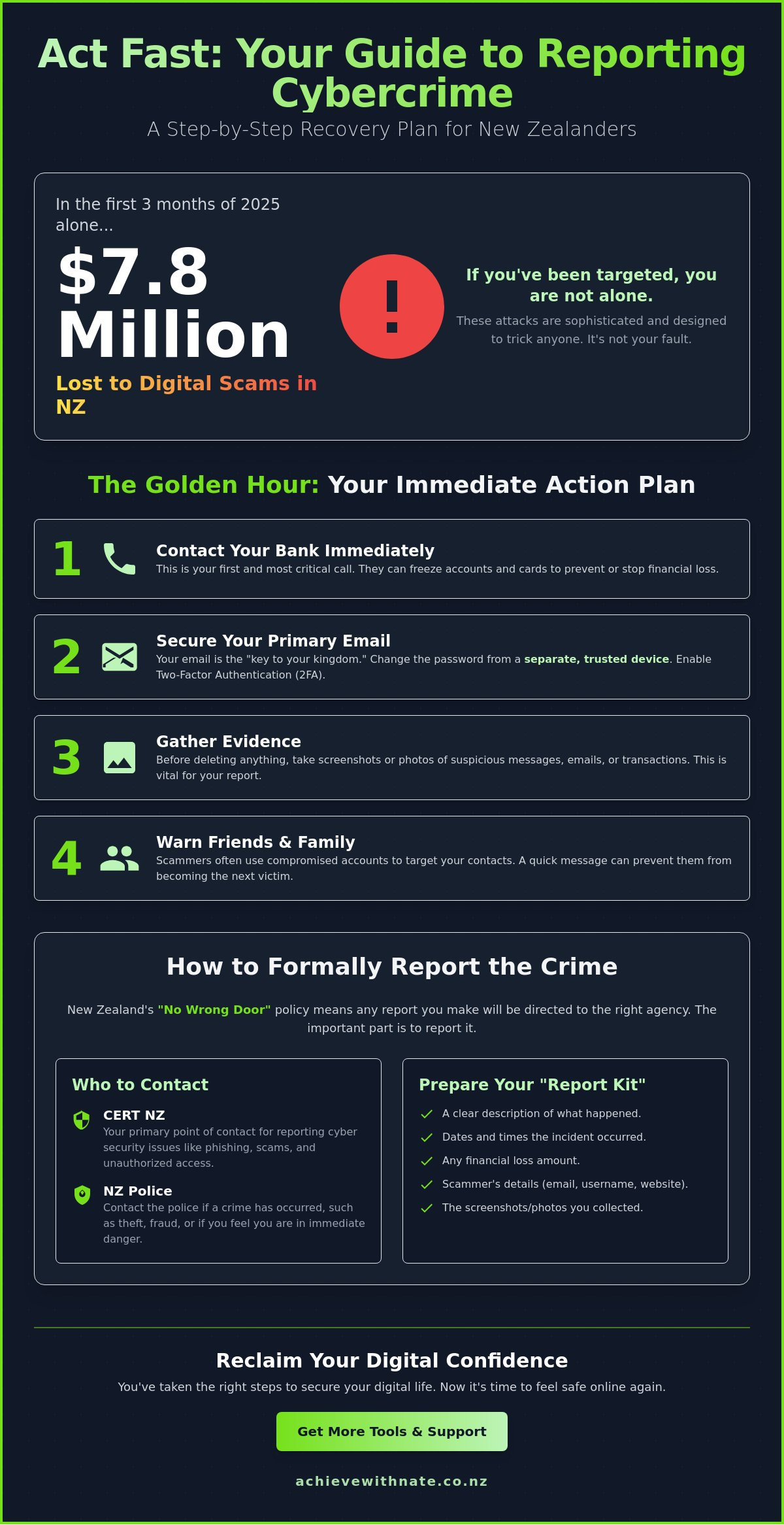
Did you know that New Zealanders lost $7.8 million to digital scams in just the first three months of 2025? It is a staggering number that proves one thing very clearly: if you have been targeted, you are certainly not alone. It is completely normal to feel shaken or even a bit embarrassed for being caught out. These modern attacks are incredibly sophisticated and are designed to trick even the most careful people. The confusion you feel about which government department to call or how to fix your accounts is something many of our neighbors face every day.
We want to help you replace that anxiety with a sense of calm control. This guide is a gentle, step-by-step map for reporting a cybercrime in New Zealand and reclaiming your peace of mind. You don't need to be a tech expert to fix this. We will walk through exactly which phone numbers to dial, how to secure your personal information, and how the "no wrong door" policy at the National Cyber Security Centre works for you. Let's take this one manageable step at a time.
Key Takeaways
Learn why the first hour is the most important time to act and how calling your bank can help protect your hard-earned money.
Discover the simple steps for reporting a cybercrime in New Zealand using a system designed to get you to the right support agency quickly.
Find out how to prepare a "Report Kit" with the specific details and screenshots needed to help authorities investigate your case.
Get clear guidance on which local agencies to contact for different situations, from the New Zealand Police to the specialists at the NCSC.
Explore a gentle path for moving forward and rebuilding your digital confidence so you can feel safe and secure online once again.
Table of Contents
Understanding Cybercrime in Aotearoa: You are Not Alone
When something goes wrong on your computer or phone, it feels like a violation of your personal space. You might wonder if you made a mistake or if your device is simply broken. In reality, cybercrime is just a modern term for someone using technology to cause harm, steal information, or take money. Thousands of New Zealanders face these challenges every year. You aren't alone in this. Understanding What is Cybercrime? is the first step toward taking your power back.
To better understand how this issue is growing in our local community, watch this helpful report:
It helps to know what we are dealing with. "Hacking" is usually when a stranger finds a digital back door into your accounts without your involvement. "Scams" are a bit different. They are "cyber-enabled" crimes where someone tricks you into opening that door for them. Both are serious. Both are valid reasons for reporting a cybercrime in New Zealand. When you report what happened, you help the whole community. Your report gives our safety agencies the data they need to stop these people from hurting others.
Is what happened to me actually a crime?
Sometimes it is hard to tell if you are looking at a technical glitch or a malicious attack. If you see a message demanding money to unlock your files, that is ransomware. If you get an email pretending to be your bank asking for a password, that is phishing. These are crimes. It is more than just a computer problem. The stress you feel is real. Digital intrusion can leave you feeling exposed and anxious. That is a completely natural reaction to having your privacy invaded.
The "No-Blame" Zone: Removing the stigma
We often hear people say they feel "silly" for clicking a link. Please know that modern scams are designed by professionals to bypass our logic. They use psychological triggers like urgency or fear to make us act quickly. Even the most tech-savvy Kiwis can get caught out when they are tired or distracted. Our goal is to help you rebuild your digital confidence in a space that is entirely free of judgment. When you begin reporting a cybercrime in New Zealand, remember that it is not your fault that someone chose to act dishonestly. You are simply taking the right steps to fix it.
Immediate Steps: What to Do the Moment You Realize Something is Wrong
The first 60 minutes after you realize something is wrong are often called the "Golden Hour." This is the time when you can do the most to protect your future self. It feels like your world is spinning, but there is a clear way through. Before you even start the process of reporting a cybercrime in New Zealand, your very first call should be to your bank. If you shared any card details or noticed strange activity, they need to know right now. They can pause your accounts and stop money from leaving before it is too late.
Next, focus on your primary email address. We often call this the "keys to the kingdom" because it controls password resets for almost every other account you own. If you can still get in, change that password immediately. You might feel like turning everything off and walking away. While disconnecting helps stop an active attack, try to take a screenshot or a photo of any strange messages first. This evidence is vital when you eventually Report Cybercrime to NZ Police.
Don't forget to tell your close friends and family. Scammers often use a compromised account to message your contacts, pretending to be you in trouble. A quick text to your inner circle can stop them from becoming the next target of a "friend-scam."
Securing your accounts without the stress
If you suspect your main computer is compromised, don't use it to change your passwords. Use a tablet or a phone that hasn't been affected instead. This ensures the attacker doesn't see your new details as you type them. Turn on Two-Factor Authentication (2FA) for your most important logins. This acts as an emergency shield that requires a code from your phone to get in. It is a simple step that provides massive peace of mind. If you feel overwhelmed by these technical steps, a bit of one-on-one digital coaching can help you get everything locked down safely.
Managing the "Digital Panic"
Take a deep breath. The tech anxiety you are feeling is a physical response to a stressful situation. It is okay to step away from the screen for five minutes to clear your head. One rule is absolute: never pay a ransom or reply to the person attacking you. The New Zealand Government officially discourages ransom payments because it rarely results in getting your data back and only funds more crime. Instead, lean on a supportive friend or a mentor. Having someone calm by your side makes the process of reporting a cybercrime in New Zealand feel much more manageable. You are doing exactly what you need to do to fix this.
Where to Report: A Simple Guide to New Zealand’s Support Agencies
When you realize you've been targeted, knowing which door to knock on can feel like solving a puzzle you never asked for. New Zealand has a few different agencies that handle digital trouble. While that sounds complicated, they actually work together behind the scenes. The most important thing is simply starting the conversation. You don't have to be an expert to ask for help, and you certainly don't need to feel alone in the process.
The central hub for technical help is the National Cyber Security Centre (NCSC). You might have heard of CERT NZ in the past; they have now joined the NCSC to create a single place for incident reports. If you need technical advice or want to alert the country to a new scam, visit CERT NZ for cyber security help. They are wonderful at providing clear, step-by-step instructions to help you recover. They focus on the technical "how" of the incident and help prevent others from falling into the same trap.
If your situation involves a direct loss of money or a physical threat, you need the New Zealand Police. They handle the criminal investigation side of things. For many, reporting a cybercrime in New Zealand starts with a visit to their local station or using the 105 non-emergency service. They understand how stressful this is and will treat your report with the seriousness it deserves. They are the right choice if you've been defrauded or threatened.
Sometimes the harm isn't about money or code. If someone is bullying you online, harassing you, or sharing things without your permission, Netsafe is the team to call. They specialize in the human side of digital safety and social media issues. They are a great companion to have when things feel personal and overwhelming.
Choosing the right door to knock on
If the crime isn't happening right now, use the 105 non-emergency number or the online police reporting tool. For technical incidents that don't involve immediate danger, the NCSC website has a simple "Report an online issue" form. If you find your identity is at risk, you might need RealMe account setup help nz to ensure your official government access remains secure. These agencies are there to serve you, so don't hesitate to reach out.
The role of your ISP and bank
Your internet service provider (ISP) and your bank are your front-line partners. If you've been hit by a network-level attack, your ISP needs to know so they can protect their other customers. Most email providers also have a "Report Spam" button. Using this helps their systems learn how to block similar attacks in the future. Remember, the NCSC operates a "no wrong door" policy. This means if you report to the wrong agency, they will simply pass you along to the right one. You don't have to worry about getting it perfect on the first try. Taking that first step is what matters most.
How to Report a Cybercrime: A Calm, Step-by-Step Walkthrough
Taking the final step to document what happened can feel like a heavy task. You might worry about technical terms or wonder if you have enough information. Please set those worries aside. The process of reporting a cybercrime in New Zealand is designed to be accessible for everyone, regardless of their tech skills. Think of this as creating a "Report Kit" that tells your story clearly. You don't need to be an expert; you just need to be yourself.
Your Report Kit is simply a collection of what you saw and heard. The most powerful tool you have is the screenshot. It captures exactly what was on your screen at that moment. On a Windows computer, you can hold the Windows key and "PrtSc" to save your screen. If you use a Mac, hold Command, Shift, and 4 to select the area you want to save. On most mobile phones, pressing the power and volume buttons at the same time does the trick. These images provide the proof that agencies need to understand the incident.
Gathering your evidence gently
Once you have your pictures, take a moment to write a simple timeline. Use plain language. You might write: "On Tuesday at 2 PM, I received an email that looked like it was from my bank." There is no need for tech-speak here. Just stick to the facts of what happened. Be sure to include:
Any email addresses or phone numbers that contacted you.
The exact website addresses (URLs) you were directed to.
Reference numbers for any bank transfers or "Reported" flags from social media.
Chat logs or messages, ensuring you don't click any links within them while you copy the text.
Keeping these details in one place makes filling out the online forms much easier. Both the NCSC and the Police use straightforward digital forms that guide you through each question. If you find the technical side of gathering this evidence stressful, our one-on-one digital coaching can provide the patient support you need to get it done.
The follow-up process
After you hit "Submit," you will usually receive a reference number. It's important to manage your expectations during this time. In the 2024/2025 period, the NCSC recorded 5,995 incident reports. Because the volume is so high, an immediate arrest or the recovery of lost funds isn't always possible. However, your report is never a waste of time. It adds to the collective safety of Aotearoa. Your data helps experts identify new trends and warn other Kiwis before they fall into the same trap. You are moving from being a victim to being a vital part of our community's defense.
Reclaiming Your Digital Confidence After a Cyber Incident
Once you have finished the process of reporting a cybercrime in New Zealand, you might feel a lingering sense of vulnerability. That is a completely normal reaction. The goal now is to move from feeling like a victim to feeling like a confident, capable user of technology. You have already taken the hardest step by speaking up and documenting the incident. Now, we can focus on making your digital world a place where you feel safe and secure again.
A "Digital Health Check" is a gentle way to reset your environment once the dust has settled. This isn't about being a tech genius or performing complex repairs. It is about taking a quiet hour to review your most important accounts. Check your login history to ensure everything looks familiar. Review your privacy settings on social media. These small, deliberate actions help you feel back in the driver's seat. It is about creating a stress-free security routine that fits your life, rather than one that feels like an overwhelming chore.
Building your digital armor
The best defense against future trouble is often the simplest. Our Device and Email Basics Training focuses on the foundation of your digital life. You will learn how to master password managers, which effectively ends the stress of remembering dozens of different codes. We also help you practice spotting the "red flags" in modern messages. When you know exactly what to look for, those suspicious emails lose their power to cause fear or confusion. You become the gatekeeper of your own data.
How Nate can help you move forward
You don't have to handle the cleanup alone. We offer personalized, patient support to help you secure your digital life without any technical jargon or judgment. If you run a local company, our business workflow optimization can identify security gaps in your daily tasks before they become problems. We believe in the importance of taking incremental, manageable actions. It is the most effective way to build lasting safety without feeling burnt out by the process. If you are ready to start, you can Book a chat with Nate to rebuild your tech confidence today.
Remember that digital safety is a journey, not a destination. By reporting a cybercrime in New Zealand and taking these recovery steps, you are protecting your peace of mind and helping our whole community. No matter how fast the digital world moves, you can find your footing. One small step at a time is all it takes to get back to a place of calm.
Taking Your Next Steps Toward Digital Peace
Reclaiming your peace of mind is a journey that starts with one small, brave act. By understanding your rights and the clear path for reporting a cybercrime in New Zealand, you have already moved past the hardest part of the experience. You now know that help is available through our local agencies and that your voice matters in keeping our whole community safe. Whether it's securing your primary email or simply breathing through the tech anxiety, every action you take is a win for your digital confidence.
If you still feel a bit shaky, that is completely okay. Technology moves fast, but you don't have to keep up alone. As a digital confidence coach for NZ seniors and a partner for small business security audits, I am here to offer empathetic, stress-free technology support. We can work together to lock down your accounts and build your skills at a pace that feels comfortable for you. Feeling overwhelmed? Let’s rebuild your digital confidence together with a patient, one-on-one session.
You have the strength to navigate this digital world with ease. Remember that taking incremental, manageable actions is the secret to lasting security. You are doing a great job.
Frequently Asked Questions
Do I need to go to a police station to report a cybercrime in NZ?
You don't need to visit a station in person to start reporting a cybercrime in New Zealand. Most people find it much easier to use the 105 non-emergency phone line or the official New Zealand Police website. This allows you to stay in the comfort of your own home where you have all your notes and evidence ready to share.
Will I get my money back if I report a scam to the police?
Reporting the crime to the police is a vital step, but it doesn't guarantee your money will be returned. The police focus on investigating the criminals and tracking trends to protect others. To try and get your funds back, your first and most important conversation should be with your bank's fraud department as soon as you notice something is wrong.
What is the difference between Netsafe and the NCSC?
These agencies handle different types of digital harm. Netsafe is your go-to for personal issues like online bullying, harassment, or social media trouble. The National Cyber Security Centre (NCSC) focuses on technical incidents, such as hacking, phishing, or ransomware attacks. Both work together, so they will guide you to the right place if you're unsure who to call.
Should I format my computer after a cyberattack?
You don't always need to take such a drastic step immediately. Formatting your computer wipes all your files and photos, which can add even more stress to your day. It's often better to start by changing your passwords on a different device and running a security scan. If you're feeling stuck, a patient coach can help you look at your options without the technical headache.
Can I report a cybercrime on behalf of an elderly parent?
Yes, you can absolutely help a loved one with the reporting process. Many Kiwis act as a digital companion for their parents or relatives. Just make sure you have as much detail as possible about the timeline and what was said. It's a wonderful way to help them feel seen and protected after a scary incident.
What happens if I accidentally clicked a phishing link but didn’t enter details?
If you didn't enter any passwords or credit card numbers, you are likely in a good position. Sometimes clicking a link can trigger a small download, so it's a good idea to run a security scan just to be sure. The main thing is that you stopped before sharing your private information. Take a deep breath; you did the right thing by closing the page quickly.
Is there a cost to report a cybercrime in New Zealand?
There is absolutely no cost for reporting a cybercrime in New Zealand to official agencies. The New Zealand Police, NCSC, and Netsafe all provide their reporting tools and support for free. These services are funded to ensure every New Zealander has access to help and can contribute to the safety of our whole digital community.

Comments