Understanding Tech Jargon for Beginners: A Gentle Guide to Digital Confidence
- kxnath
- 2 days ago
- 13 min read
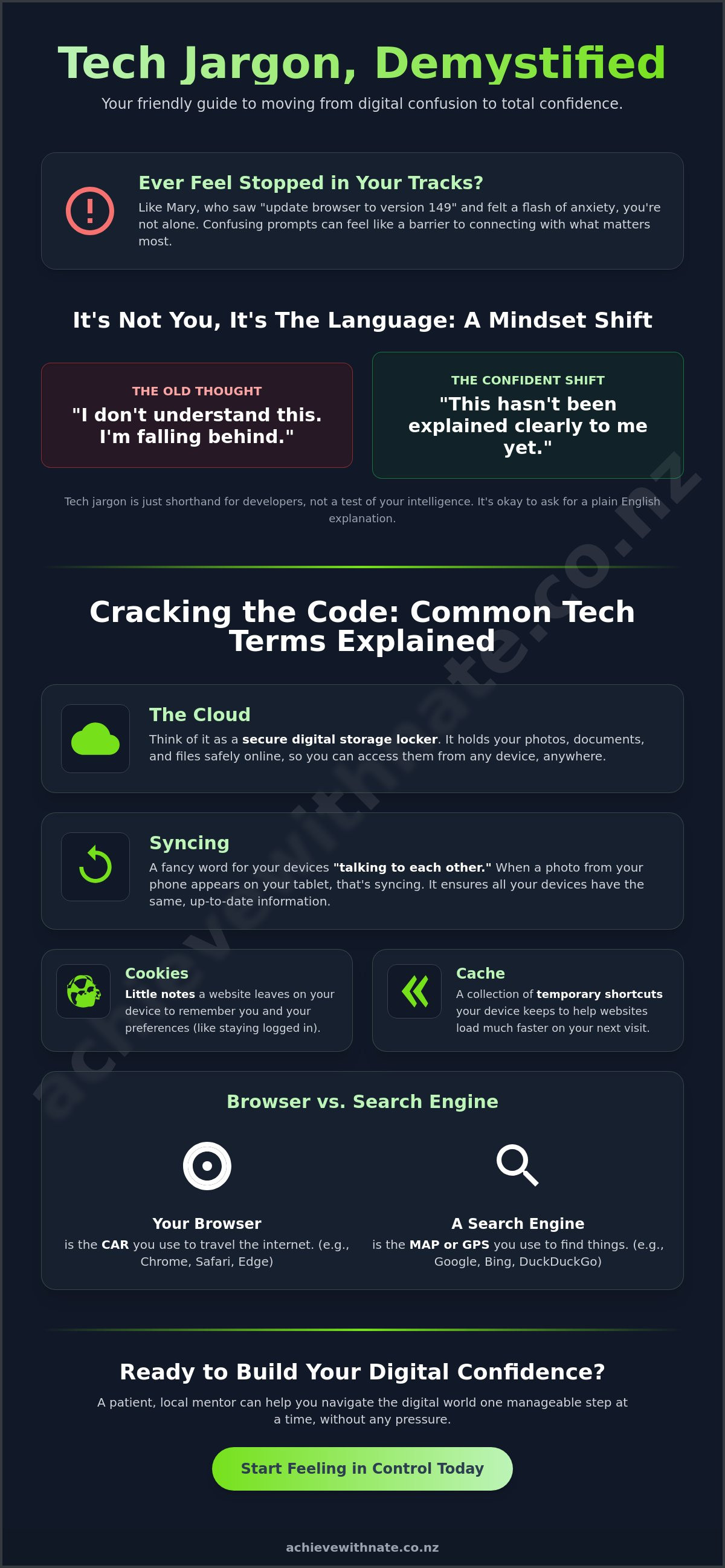
Last Tuesday, Mary sat down to video call her grandkids, but a prompt about "updating her browser to version 149" stopped her in her tracks. She felt that familiar flash of anxiety, worried that clicking the wrong button might disconnect her from her family. Many of our neighbors find themselves in this exact spot, struggling with understanding tech jargon for beginners because the digital language changes so fast. It often feels like everyone else got a secret handbook that you missed out on. Those confusing words don't have to keep you from the things that matter most.
We know how frustrating it is to feel like you're falling behind or to worry that a simple prompt is a trap. It's perfectly normal to want clear answers without the headache. This guide is here to help you move from feeling overwhelmed to feeling truly in control. We'll break down those confusing terms into plain English. We'll explain what things like "the cloud" or the new "AI agents" actually mean for your daily life. By the end, you'll have the digital confidence to use your phone or computer and ask questions without any of the stress.
Key Takeaways
Understand why tech terms are just a shorthand used by creators. It is not a barrier meant to keep you out or make you feel small.
Learn the "digital storage locker" secret to finally understanding the cloud. No more guessing where your precious photos actually go.
Discover a stress-free strategy for understanding tech jargon for beginners that helps you stay calm when a new prompt appears.
See how your devices can become tools that truly serve you. Move from feeling left behind to feeling in total control of your digital life.
Find out how a patient, local mentor can help you build your digital confidence one manageable and steady step at a time.
Table of Contents
Why Tech Jargon Feels Like a Foreign Language (And Why That's Okay)
Have you ever felt like a tourist in your own living room while trying to use your tablet? You aren't alone. Many Kiwis feel a sense of digital overwhelm when they see words that look like English but don't make any sense in context. It feels like everyone else was handed a secret dictionary at birth. The truth is that understanding tech jargon for beginners isn't about being "smart enough" to keep up. It's about realizing that these words weren't designed for you. They were designed for the people who build the machines.
Think of tech jargon as a professional shorthand. It's like a group of doctors or mechanics using specific terms to communicate quickly during a busy shift. When a developer says "cache," they're just using a quick label for a digital storage spot. They aren't trying to lock you out of the conversation. In fact, even the experts have to look things up. Technology moves so fast that nobody knows every term. Real digital confidence starts when you realize it's okay to say, "I don't know what that means yet."
To better understand this concept, watch this helpful video:
The 'Gatekeeper' Effect of Big Words
Complicated language often acts like a "Keep Out" sign. It makes technology feel exclusive and intimidating. You might feel behind because a word was invented yesterday, but that's just the nature of the industry. It's helpful to distinguish between "marketing buzzwords" and "functional terms." Marketing words are designed to sound fancy so you'll buy something. Functional terms are the actual tools you use. If you ever feel stuck, you can browse a glossary of computer jargon to see how simple these concepts really are when stripped of their shiny packaging.
Reframing Your Relationship with Tech Talk
The next time you see a confusing prompt, try a small mindset shift. Instead of thinking, "I don't understand this," try saying, "This hasn't been explained clearly to me yet." You have every right to ask for a plain English explanation. There is great power in stopping a conversation to ask for clarity. Tech jargon is simply a linguistic tool designed for professional efficiency rather than a true measure of a person’s intelligence or technical ability. Learning to navigate this world is a journey. We take it one manageable word at a time, without any of the pressure to be perfect.
Everyday Jargon: Cracking the Code of Your Devices
When you're sitting with your laptop or phone, it's common for a little box to pop up with a word that feels like a riddle. You don't need a degree in computer science to handle these moments. In fact, understanding tech jargon for beginners is mostly about finding the right analogies. Take "The Cloud," for example. It isn't a fluffy white object in the sky. Instead, think of it as a secure digital storage locker. It holds your photos and files in a safe place so you can access them from any device, anywhere you happen to be. If these terms still feel a bit slippery, you might find that one-on-one digital coaching helps you feel much more at home with your gadgets.
Once your files are in that digital locker, you'll often hear about "Syncing." This is just a fancy way of saying your devices are talking to each other. When you take a photo on your phone and it magically appears on your tablet, that's syncing in action. It ensures all your devices are on the same page. If you ever feel stuck, you can find simple explanations in a guide to IT terms that makes these concepts easy to grasp. You might also see mentions of "Cookies" or "Cache." These aren't nearly as technical as they sound. Cookies are like little notes a website leaves in your pocket so it remembers your preferences next time. A cache is just a collection of temporary shortcuts your device keeps to help websites load faster.
The Words You See on Your Screen
It's helpful to know the difference between your Browser and a Search Engine. Your browser, like Chrome version 149 or Safari 26.5, is the car you drive. The search engine, like Google, is the map you use to find where you're going. Behind all of this is your Operating System, or "OS." This is the boss of your computer, such as Windows 11 version 26H1. When your device asks for an "Update," it's usually just patching a small hole or fixing a tiny bug. An "Upgrade" is a bigger change, like getting a whole new engine for that car. Both usually require a quick restart to let the boss get things settled.
Connections and Sharing
Wi-Fi vs. Data: Wi-Fi is the invisible connection in your home or a cafe. Data is what your phone uses when you're out and about, like at the park or the shops.
Bluetooth: Think of this as an invisible wire. It connects your headphones to your phone or your phone to your car without any actual cables.
Download vs. Upload: A download is when you pull information from the internet onto your device, like saving a photo from an email. An upload is when you send something from your device out into the world.
Understanding these directions helps you feel more in control of where your information is going. You're doing a great job taking these small, steady steps toward digital confidence.
The Big Mysteries: AI, Security, and Your Privacy
Moving beyond the physical buttons on your screen, we often encounter big, abstract concepts that feel like they belong in a science fiction movie. Words like "Artificial Intelligence" or "The Algorithm" can sound intimidating; however, they are just new names for tools that have been around for a while. Your journey into understanding tech jargon for beginners is about peeling back the mystery to see the simple purpose underneath. If you find yourself wondering about the bigger picture, you might enjoy reading What Does 'Digital' Actually Mean? for a bit more context.
Demystifying AI for Everyday Kiwis
You might have heard about ChatGPT or "Generative AI" on the news lately. Think of Artificial Intelligence (AI) as a very smart digital assistant that is incredibly good at recognizing patterns. While older computer programs only did exactly what they were told, AI can "create" things like text or images by looking at millions of examples first. Global AI adoption reached 75% by early 2026, meaning it's likely already helping you in small ways. It's the "predictive text" that guesses your next word in a text message or the way Netflix knows which shows you'll enjoy. Artificial Intelligence is a tool that learns patterns to help you with everyday tasks.
Then there is "The Algorithm." This sounds like a mathematical monster, but it's really just a set of rules a website uses to decide what to show you. If you spend time looking at gardening photos on Facebook, the algorithm notices and shows you more plants. It's like a shopkeeper who learns your favorite biscuits and keeps them at the front of the shelf. You can find more technology jargon terms explained if you want to dive deeper into how these systems work.
Security Words That Keep You Safe
Protecting yourself online is a priority for everyone. You might see a request for "Two-Factor Authentication" or 2FA. This is simply a second lock on your digital door. Even if someone finds your key, such as your password, they still can't get in without the second code sent to your phone. It's a small extra step that provides a lot of peace of mind. Other terms you should know include:
Phishing: This is digital trickery. It's when a scammer sends an email pretending to be your bank or the post office to try and "fish" for your private details.
Encryption: This is like sending a letter in a secret code. It scrambles your messages so only the person you're talking to can read them.
Malware and Viruses: These are digital "bugs" that can make your computer feel slow or sick. Good security software acts like a vitamin to keep these pests away.
Understanding these terms helps you feel safer and more confident. Understanding tech jargon for beginners isn't about becoming a technical expert; it's about knowing which locks to use to protect your privacy. Taking these small, steady steps makes the digital world feel much smaller and more manageable.
Your Stress-Free Strategy for Handling New Words
Encountering a new word shouldn't feel like hitting a brick wall. It's simply a sign that someone hasn't explained things clearly yet. When you're focused on understanding tech jargon for beginners, having a plan can turn a moment of stress into a moment of growth. You don't need to memorize a thick manual. You just need a few simple tools to keep in your back pocket. This strategy is all about keeping you in the driver’s seat of your own digital journey.
Step 1: Don't panic. When a term like "Zero Trust" or "Neural Network" appears, remember it's just a label. It can't hurt your computer. It's just a word. Step 2: Use context clues. If a box mentions your "browser" while you're trying to view a website, you can guess it's the tool you're currently using. Step 3: Ask for plain English. If a person is helping you, simply say, "Could you explain that without the tech talk?" Step 4: Start a personal tech dictionary. Keep a small notebook by your desk. Writing a word down in your own language makes it stick. For example, you might write: "The Cloud is my digital storage locker."
How to Ask the 'Grandkids' Without the Guilt
It's wonderful when family helps, but they often move at lightning speed. You might feel like you're being a nuisance, but you aren't. They just forget how much they've learned over the years. Try using specific phrases like, "Could you show me that one more time, but slower?" or "I want to learn how to do this, not just have you do it for me." Setting these boundaries is a huge part of gaining digital independence in retirement. It turns a quick fix into a lasting skill that you can use tomorrow.
Reliable Resources for Quick Checks
If you're on your own, the internet itself is a great teacher. When you search for a term on Google, always add the phrase "for beginners" or "simple definition." This filters out the dense, technical articles and gives you the clear answers you deserve. YouTube is also a fantastic visual dictionary. Seeing someone click the buttons while they explain the words can make everything click into place much faster. We know that understanding tech jargon for beginners is easier when you have a patient guide by your side. If you'd prefer a more personal touch, our one-on-one digital coaching provides a safe, criticism-free space to ask every question on your list.
Building Digital Confidence One Word at a Time
Technology is a tool. It exists to serve you, not the other way around. Whether you're sending an email to a friend or checking your bank balance, these digital tasks should make your life easier. When the language feels like a barrier, it's easy to feel small or inadequate. But remember that understanding tech jargon for beginners is a skill you build in small, steady steps. You don't need to be an expert to feel in control. You just need to know enough to feel safe and comfortable.
Gaining this knowledge does more than just stop the headaches. It actually keeps you safer. When you understand what a "cookie" is or why "2FA" matters, you're building a digital shield around your private life. You'll also find that you get things done faster. Instead of staring at a confusing prompt for ten minutes, you'll know exactly which button to click. This isn't about mastering every piece of software. It's about having the confidence to explore your devices without the fear of breaking something.
Why a Digital Confidence Coach Makes the Difference
Sometimes, reading a guide isn't enough. You might want someone to sit beside you and answer your specific questions. That's where a Digital Confidence Coach NZ can help. Nate works with Kiwis who want to master their technology without the stress of a fast-paced classroom. In a one-on-one session, no question is ever too basic. We focus on what you actually need to do, whether that's organizing your photos or setting up a new email account. We replace the digital fog with clear, manageable actions that stick.
Your Next Manageable Action
Confidence grows when we share what we've learned. Here is a small challenge for you today. Pick one word from this guide, like "The Cloud" or "Syncing," and explain it to a friend or family member. Teaching someone else is the best way to prove to yourself that you've got it. It turns a confusing term into a familiar tool. This simple act of sharing helps you realize how far you've already come on this journey. It also helps others who might be feeling the same way you were this morning.
If you still feel a bit of anxiety when you look at your screen, that's okay. You don't have to do this alone. A gentle chat can help you see which steps to take next. We are here to support you every step of the way, ensuring you feel seen and understood. Ready to stop the stress? Let's chat about your digital goals. Taking that first step is the most important part of building your new digital life. You've got this, and we are right here with you. We'll help you find your footing and keep moving forward with understanding tech jargon for beginners at your own pace.
Step Into Your Digital Future With Confidence
You've taken a brave step today. By looking at these terms as simple tools rather than scary barriers, you're already moving forward. You now know that the "cloud" is just a digital locker and "AI" is just a helpful assistant. Understanding tech jargon for beginners isn't about knowing every single word; it's about having the confidence to ask what things mean without any shame. It's okay to move slowly. Every small step counts toward your digital independence.
If you're ready to turn that curiosity into lasting confidence, we are here as your supportive companions. Nate provides patient, one-on-one coaching for Kiwis in a completely no-judgment environment. We focus on the practical, everyday digital skills that matter most to your life. You don't have to do this alone. Book a stress-free digital confidence session today and let's clear the fog together. Taking one manageable action today is the best way to feel truly in control.
Frequently Asked Questions
What is the difference between hardware and software?
Hardware is anything physical you can touch, like your keyboard, mouse, or the screen itself. Software is the invisible set of instructions that tells that hardware what to do, like your email program or a game. Think of it like a book; the paper and ink are the hardware, while the story written inside is the software. Both need to work together for your computer to be useful.
Is 'The Cloud' a physical place where my photos go?
Yes, the cloud is actually a collection of very large, secure computers located in data centers around the world. When you save a photo to the cloud, you're just sending a copy to one of these secure buildings for safekeeping. It isn't a literal cloud in the sky. It's just a way to keep your files safe outside of your own phone or laptop so you can access them anywhere.
What does it mean when a website asks me to 'accept all cookies'?
When you accept cookies, you're allowing a website to keep small notes about your visit in your browser's memory. These notes help the site remember your login details or what you left in a shopping cart. While most are helpful for a smooth experience, some are used to track which ads you might like. You can usually choose to "accept only essential" ones if you want more privacy.
How can I tell if a tech term is actually important or just a buzzword?
Understanding tech jargon for beginners becomes easier when you look for the "why" behind the word. If a term describes a tool you actually use, like "browser" or "Wi-Fi," it is important. If it sounds like a fancy sales pitch, like "synergistic cloud-native solutions," it’s likely just a marketing buzzword. If you can't find a plain English definition that makes sense for your daily life, it's probably not worth your stress.
Why do I need to 'Sync' my devices if they are already on the same Wi-Fi?
Being on the same Wi-Fi is like being in the same house, but syncing is like making sure everyone in the house has the same shopping list. Wi-Fi provides the connection that lets your devices talk. Syncing is the actual conversation where they share updates. Without syncing, your tablet won't know that you deleted an email on your phone, even if they are sitting right next to each other on the couch.
What happens if I click 'Update' and I don't know what it's changing?
Clicking update is usually the safest choice you can make for your device. Most updates are "security patches" that fix tiny holes where digital bugs could get in. While the look of an app might change slightly, the main goal is to keep your device running smoothly and safely. It's like giving your car a quick tune-up to prevent a breakdown later on. You are protecting your digital home.
Is AI going to replace the way I use my computer?
AI isn't here to take over; it is here to act as a very capable assistant. You will still use your mouse and keyboard just like always. However, you might notice the computer getting better at helping you write emails or finding photos of your grandkids. It's a new layer of help that makes your existing tools more powerful and a bit more intuitive to use as you go about your day.
How much tech jargon do I actually need to know to stay safe online?
You only need to know a handful of core terms to stay very safe. Understanding tech jargon for beginners focuses on "safety first" words like phishing, 2FA, and encryption. Once you grasp these few concepts, you've already done most of the work to protect yourself. You don't need to learn the complex language of IT experts to enjoy a worry-free and happy life online.

Comments