


Email Management: A Stress-Free Guide to a Calmer Inbox

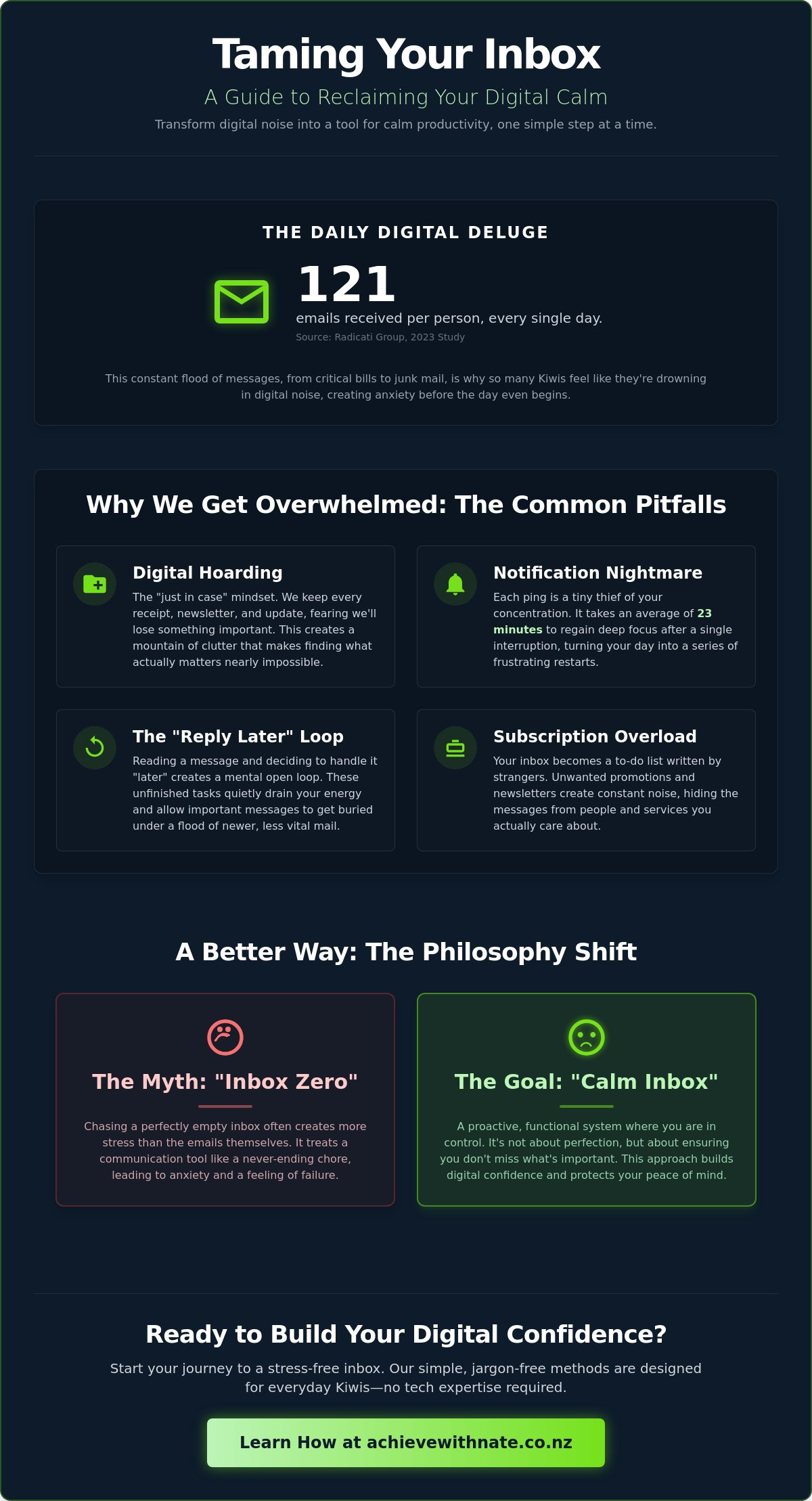
Last Tuesday, Sarah from Christchurch opened her laptop to find 4,327 unread messages staring back at her. That familiar knot of anxiety tightened in her chest as she wondered if an important power bill or a message from her grandkids was buried somewhere in the mess. According to a 2023 study by the Radicati Group, the average person now receives 121 emails every single day. It is no wonder so many everyday Kiwis feel like they are drowning in digital noise. Effective email management doesn't have to be a complicated chore reserved for tech experts. It's about finding a simple rhythm that works for your life.
We all know the frustration of a cluttered inbox that feels impossible to clear. It's exhausting to deal with constant pings, and it's even worse when you feel embarrassed about the state of your digital life. This guide will show you how to transform that mess into a tool for calm productivity with no jargon and no pressure. We will walk through small, manageable steps to filter your messages, organize your folders, and help you regain your digital confidence without the stress.
Key Takeaways
Learn how to move away from the "perfect inbox" myth and reclaim your digital calm with a human-first approach.
Identify the common traps like "digital hoarding" and notification pings that cause everyday Kiwis to feel overwhelmed.
Discover simple, jargon-free email management steps to clear the noise and organize messages into categories that actually make sense.
Get practical tips for setting up automatic filters on local services like Xtra Mail and Spark to handle the heavy lifting for you.
Find out how starting with just 10 minutes a day can build your digital confidence one small step at a time.
Table of Contents What is Email Management? (And Why It Matters for Your Peace of Mind) Why We Get Overwhelmed: The Common Pitfalls A 5-Step How-To Guide for a Stress-Free Inbox Practical Tools and Settings for NZ Users Building Your Digital Confidence One Step at a Time
What is Email Management? (And Why It Matters for Your Peace of Mind)
Many everyday Kiwis feel a heavy weight in their chest when they open their computer. It is that wall of unread messages that never seems to shrink, no matter how many you delete. To put it simply, What is Email Management? involves using specific techniques and tools to handle your digital mail effectively. It's about making sure your email serves your life, rather than your life revolving around your notifications. This process helps you reclaim your time and find a sense of digital calm.
This isn't just about being tidy; it's about your security. In 2023, CERT NZ reported that phishing and credential harvesting remain top threats for people across Aotearoa. Proper email management helps you spot these risks because you aren't rushing through a cluttered mess. You gain the space to think clearly before you click a link or share a password. When your inbox is managed, you're much less likely to fall for a scam sent by a stranger.
To better understand this concept, watch this helpful video:
There's a big difference between "organising" and "managing" your correspondence. Organising is often just moving a mess into different folders where you might still lose track of it. Managing is a proactive system. It means you know exactly what needs your attention, what can be deleted, and what is safely stored for later. It is a shift from being reactive to being in the driver's seat of your digital world.
The "Calm Inbox" Philosophy
We believe technology should work for you. It's okay to feel overwhelmed by how fast things change. Our goal is to help you build "Digital Confidence," which is the feeling of being capable and steady when you sit down at your screen. A calm inbox isn't about being a tech expert. It's about setting boundaries so that your email doesn't shout at you all day long. We take things one small step at a time to ensure you feel supported.
Why "Inbox Zero" is Often a Myth
Chasing a completely empty inbox often creates more stress than the emails themselves because it treats a communication tool like a chore that is never truly finished.
We focus on functional management rather than perfection. Your inbox can be a useful tool even if it isn't empty. The aim is to have a system where you don't miss the important stuff, like a bill or a message from a grandchild. You can start exactly where you are today. No jargon, no pressure, and no judgment.
Why We Get Overwhelmed: The Common Pitfalls
Seeing that little red notification bubble with "9,999+" unread messages isn't just a number. It's a heavy weight on your shoulders before you've even had your morning coffee. This digital hoarding happens because we worry about losing something important. We keep every receipt, every newsletter, and every old update just in case. However, this clutter makes effective email management feel like an uphill battle.
The notification nightmare adds another layer of stress. Every ping is a tiny thief stealing your concentration. Research from the University of California, Irvine, found it takes an average of 23 minutes to get back into a deep flow after one interruption. If your phone buzzes ten times before lunch, you're losing hours of your life to a screen. It's no wonder so many Kiwis feel exhausted by midday.
Generic advice often fails because it lacks a Kiwi heart. A lot of online guides are written for high-flying tech executives in Silicon Valley, not for people living in Aotearoa who just want to stay in touch with family and handle their bills. This disconnect makes us feel like we're doing something wrong when the "hustle" methods don't work for our everyday lives. We need a way to feel capable and calm, not pressured to be a productivity machine.
The "Reply Later" Procrastination Loop
When you read a message and decide to "reply later," you're creating a mental open loop. These unfinished tasks sit in the back of your brain, quietly draining your energy. Important notes from friends or local businesses end up buried under newer, less vital mail. We use a no judgment approach to tackle this. It doesn't matter how big the pile is; we simply take one small step at a time to close those loops and find your digital confidence.
Subscription Overload
Your inbox often feels like a to-do list written by strangers. Marketing emails are experts at disguising themselves as urgent tasks. They use bright buttons and "final notice" language to trick your brain into thinking they're important. This noise makes it hard to distinguish between a genuine message and a sales pitch. If you're ready to clear the noise and focus on what matters, a Free Clarity Call is a gentle way to start your journey toward a calmer inbox.
A 5-Step How-To Guide for a Stress-Free Inbox
Getting your digital life in order doesn't need to be a marathon. It's about taking small, manageable steps that stick. Effective email management is less about being a tech expert and more about creating a routine that respects your time and peace of mind. Here is a simple five-step process to help you reclaim your inbox today.
Step 1: The "Great Unsubscribe." We often let clutter build up because it feels easier than dealing with it. If you haven't opened a newsletter or a promotional offer in the last 90 days, it's time to let it go. Look for the small "unsubscribe" link at the bottom of the email. Clearing this noise first makes every other step much easier.
Step 2: Simple, Human Categories. You don't need fifty different folders with complex names. Stick to three or four simple labels like "To Action," "Waiting for Reply," or "Important Info." Using plain language helps you decide where an email belongs in seconds.
Step 3: The "Two-Minute Rule." This is a game changer for many Kiwis. If an email takes less than 120 seconds to answer, do it immediately. If it requires more thought or research, move it into your "To Action" folder and move on.
Step 4: Set a "Check-In" Rhythm. Constant notifications can make you feel like you're always on call. Try checking your mail just three times a day; perhaps at 9:00 am, 1:00 pm, and 4:00 pm. This allows you to focus on your actual life in between.
Step 5: Archive the Past. If an email is from 2023 and you've already dealt with it, you don't need it sitting in your face. Hit the archive button. It stays in your system if you ever need to find it, but it stops cluttering your view right now.
How to Organise Without the Jargon
Many people get stuck trying to use "pro" settings that they don't actually need. Keep things friendly and human. Use folders like "To Keep" for things like receipts or family photos. The "Archive" button is your best friend here; it hides the email without deleting it forever. If you want to feel more confident with these buttons, our device and email basics training offers a gentle way to learn these skills at your own pace.
Mastering the Search Function
Modern email management relies heavily on the search bar. In fact, searching for a keyword is often 50% faster than clicking through deep folders to find a specific file. To find a bill or a flight, just type the name of the company or the word "invoice" into the search box at the top. Once you trust that you can find anything in seconds, you'll feel much more comfortable moving old emails out of your main inbox.
Practical Tools and Settings for NZ Users
Managing your inbox doesn't have to be a solo struggle. Many everyday Kiwis still use Xtra Mail or Spark accounts. While these are reliable, their web interfaces can sometimes feel a bit cluttered. If you're feeling stuck with an older provider, the first step to better email management is often moving your mail into a dedicated app like Outlook or Apple Mail. This keeps your old address but gives you better tools to stay organised. It's a simple change that makes a world of difference.
Setting up "Rules" or "Filters" is like having a digital personal assistant. You can tell your computer to automatically move newsletters to a "Read Later" folder or send receipts straight to a "Tax" folder. It takes about two minutes to set up. It saves hours of manual sorting every month. AI is also stepping in to help. Modern systems now suggest short replies or draft emails for you. It's not about the computer taking over; it's about giving you a head start so you don't have to stare at a blank screen.
Security is just as vital as organisation. In 2023, New Zealand authorities reported a significant rise in phishing scams targeting local users. Watch out for "Kiwi-themed" tricks. These often look like fake NZ Post delivery alerts or urgent IRD tax refund notices. If a message feels slightly "off" or creates a sense of panic, it's usually a scam. Take a breath. Don't click any links. A calm mind is your best defence against these digital intruders.
Outlook, Gmail, and Apple Mail: A Simple Comparison
Choosing the right tool depends on your needs. Gmail is fantastic for seniors because its search function is incredibly powerful. You don't need to be perfectly tidy; you just need to remember one word from the email. Outlook is the gold standard for small business owners who need to balance calendars and tasks in one place. Apple Mail is the cleanest option for those who want a simple, distraction-free view. You can easily customise these apps to hide "extra" buttons, leaving only the ones you actually use every day.
The "Free Clarity Call" for Tech Help
There comes a point where reading guides isn't enough. If you've tried to set up filters or move your Xtra mail and things just aren't clicking, you don't have to do it alone. Nate works with people across Aotearoa to turn tech frustration into digital confidence. As a digital confidence coach NZ, he can walk you through these settings at your own pace. No judgment, no jargon; just a helping hand to get your email management back under control.
Ready to stop the stress?
and let's simplify your digital life together, one small step at a time.
Building Your Digital Confidence One Step at a Time
Real change happens when you focus on habits instead of just downloading another app. Software is a tool, but your daily routine is the engine that makes it work. You don't need a complex system or expensive subscriptions to see results. Just 10 minutes of focused effort each day can transform how you feel when you sit at your desk. It's about consistency, not intensity. When you dedicate a small slice of your morning to your inbox, you start the day with a win. This simple shift is the secret to lasting email management.
Personalized coaching provides a shortcut through the noise. Instead of watching generic videos that don't quite fit your situation, you get a guide who listens. One on one support means we look at your specific screen and your specific challenges together. It's a conversation, not a lecture. You have the ability to handle these digital tools with ease; you just need a bit of patient encouragement to find your way. Every Kiwi deserves to feel like they are in the driver's seat of their own technology.
The "No Judgment" Zone
Nate’s approach is built on a foundation of empathy and real Kiwi heart. In our sessions, we create a space where you can breathe easy. There are no silly questions about technology here. Whether you've forgotten a password for the tenth time or feel stuck on a basic setting, we handle it with patience. This is the core of the Achieve With Nate Movement. We value the person behind the screen more than the software itself. We use plain language to build your digital confidence because everyone in Aotearoa deserves to feel calm and capable.
Next Steps for Your Inbox
You don't have to fix everything at once. Start small and be kind to yourself. To improve your email management today, try these three simple actions:
Pick one folder: Choose just one subfolder or a specific date range to tidy up or archive.
Unsubscribe: Find three newsletters or promotional emails you haven't read in months and hit that unsubscribe link.
Take a breath: Close your eyes for a moment and remember that you've got this.
Technology should make your life easier, not harder. By taking things one small step at a time, you'll find the calm you've been looking for. You are more than capable of mastering your digital world, and we are here to walk beside you every step of the way.
Take Control of Your Digital Space Today
Your inbox shouldn't be a source of daily dread. By applying the 5-step guide and using tools designed for our local New Zealand context, you can transform your relationship with technology. It's about more than just clearing messages; it's about reclaiming your focus. Mastering email management is a skill that grows with practice. Every small change you make today builds the digital confidence you need for a more peaceful tomorrow.
If you're feeling stuck, I'm ready to walk alongside you. I provide personalized one-on-one support with real Kiwi heart and absolutely no jargon. My coaching is a "no judgment" zone where we tackle your tech challenges at your own pace. There's no pressure to be an expert. We'll just focus on what works for you and your life. You deserve a workspace that feels light and organized.
You're closer to a calm inbox than you think. Book a Free Clarity Call with Nate to reclaim your inbox and let's get started. You've got this.
Frequently Asked Questions
How do I unsubscribe from emails that don’t have an unsubscribe link?
You can block the sender or mark the message as spam using your email provider's built-in tools. Under the Unsolicited Electronic Messages Act 2007, New Zealand businesses are legally required to provide a clear unsubscribe facility. If it's missing, the email is likely untrustworthy. Simply select the message and click "Block" or "Report Spam" to stop it from cluttering your inbox again. It's a quick way to keep things tidy.
Is it safe to delete old emails, or should I archive them instead?
Archiving is usually the best choice because it hides the message without permanently deleting it. Gmail gives you 15GB of free storage, which holds thousands of text-based emails. You should only delete items that are definitely junk, like old supermarket flyers or expired coupons. This approach ensures you can always find a receipt or an old conversation later using the search bar, giving you peace of mind and better digital confidence.
How can I stop getting so many spam emails in my Gmail or Xtra account?
Start by using the "Report Spam" button so your provider learns what to filter out. In 2023, spam made up roughly 45 percent of all emails sent worldwide. If you use Xtra, log into their webmail portal to check your security settings. Avoid entering your address on random websites or public competitions. These small steps help protect your digital space and keep your email management simple and stress-free.
What is the best way to manage a business email vs. a personal one?
Use two different apps or separate browser profiles to keep your professional and private lives from blurring together. This separation is a key part of effective email management because it prevents work stress from leaking into your evenings. You might use the Outlook app for your job and the Gmail app for family messages. Setting these boundaries helps you stay focused during the day and fully relaxed when you're off the clock.
How much time should I spend on email management each day?
Try to limit your time to 45 minutes a day, split into two or three short sessions. Constant checking can hurt your productivity, as studies show it takes about 23 minutes to get back into a "flow" state after an interruption. By batching your replies, you regain control over your schedule. It's much calmer to handle messages on your own terms rather than reacting to every single notification that pops up.
Can Nate help me set up my email on my phone and computer?
Nate can certainly help you get your email accounts synced across all your devices. Whether you have a new iPhone, a Samsung tablet, or a Windows laptop, he'll walk you through the process step by step. There's no pressure and no confusing tech talk. You'll learn how to access your messages anywhere, giving you the confidence to stay connected with friends and family without the usual technical headaches.
What should I do if my inbox is already at 10,000 unread messages?
The fastest solution is to archive every message older than 90 days in one single move. This immediately clears your view without actually losing any of your history. You can then focus on the most recent emails that actually need your attention. It's a "no judgement" way to start fresh. Taking this one small step can transform a mountain of digital clutter into a clean, manageable workspace in just minutes.
How do I know if an email is a scam or a real message from a NZ company?
Look closely at the sender's email address and hover your mouse over any links to see where they really lead. CERT NZ received over 8,000 reports of cyber incidents in 2023, so it's important to stay vigilant. Real NZ companies like banks or power providers will never ask for your password via email. If a message feels urgent or "off," trust your gut and delete it. Staying safe is about being cautious.


Comments