


How to Use Microsoft Copilot NZ for Daily Business Tasks: A Stress-Free Guide

Last Tuesday, a small business owner in Christchurch spent nearly three hours manually sorting through long email threads just to find one client update. It’s a common story across Aotearoa, where the pressure to learn tools like co pilot nz often leads to more stress than success. You might feel like you’re being left behind by the rapid pace of change, but it’s okay to take a breath. It’s completely normal to feel overwhelmed by software that promises to save time but seems to require a degree in computer science just to open.
This guide is here to help you find your footing with Microsoft’s AI without any of the complicated jargon. We promise to help you master the basics so you can feel confident and in control of your digital workspace. We’ll walk through how to automate those boring admin tasks step by step. By the end of this read, you’ll have a clear plan to turn that tech anxiety into genuine digital confidence, one small step at a time.
Key Takeaways
Understand how this digital assistant works within your Microsoft 365 apps to create content and lighten your daily workload.
Follow a calm, step-by-step guide to get co pilot nz up and running on your device without any technical jargon.
Learn practical ways to reclaim your time, from summarising long email threads to drafting local business proposals in Word.
Build your digital confidence by starting with small, low-stakes tasks that let you play with the tool at your own pace.
Table of Contents What is Microsoft Copilot NZ and Why Does it Matter? How to Get Started with Copilot: A Step-by-Step Guide Practical Ways to Use Copilot for Your NZ Business Overcoming Tech Anxiety: Taking One Small Step at a Time
What is Microsoft Copilot NZ and Why Does it Matter?
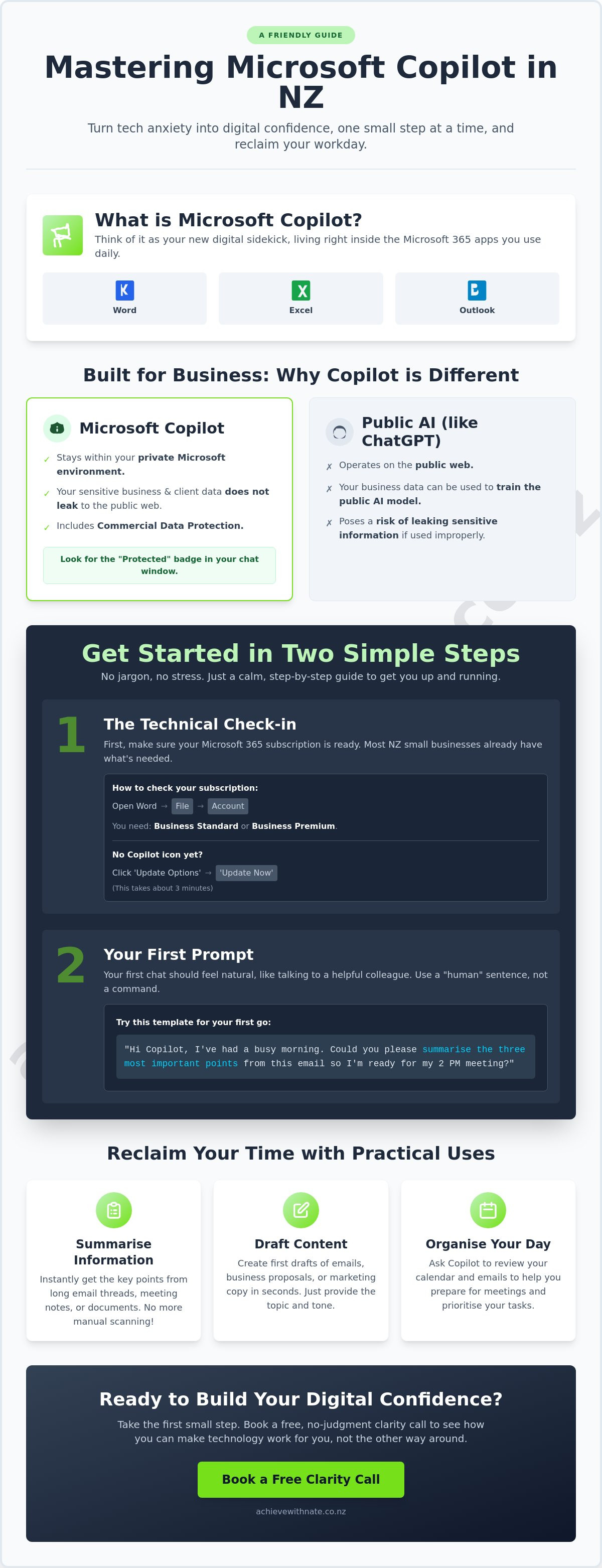
Think of co pilot nz as your new digital sidekick. It lives right inside your Microsoft 365 apps, such as Word, Excel, and Outlook. Unlike a regular search engine that only points you toward a website, Microsoft Copilot actually rolls up its sleeves to help. It can draft emails, summarize long meeting notes, and help you organize your busy day. It's designed to take the heavy lifting out of your computer work.
To better understand this concept, watch this helpful video:
For everyday Kiwis, the biggest win is clearing away digital clutter. We often spend too much time on boring admin tasks that drain our energy. By 2026, AI will be a standard tool for small businesses across Aotearoa. Getting comfortable with it now means you can stay ahead without the stress. It’s about making technology work for you, rather than you working for the technology.
The Human Side of AI in New Zealand
Tech anxiety is a very real feeling for many of us. You aren't alone if the idea of "AI" feels a bit heavy or confusing. Moving from worry to digital confidence is much easier when you have a friendly guide. This approach fits perfectly with the digital confidence coach NZ philosophy. We focus on the person, not just the software. It is a no-judgment zone where you can learn at your own pace. It is about feeling human and capable while you master these new tools, one small step at a time.
Copilot vs. ChatGPT: A Quick Comparison
You might have tried ChatGPT and found it helpful for general ideas. However, co pilot nz is built differently for business. It stays within your private Microsoft environment. This means your sensitive business data and client information don't leak out to the public web. Because it is built into Word and Outlook, you don't have to keep switching between different windows. It’s right there where you already work, keeping your day simple and secure.
How to Get Started with Copilot: A Step-by-Step Guide
Setting up co pilot nz doesn't have to be a technical mountain to climb. It's designed to fit right into the tools you already use every day. If you can open an email, you can start using AI to make your workday lighter. Let's take this one small step at a time to get you up and running without the stress.
Step 1: The Technical Check-in
First, we need to make sure your tools are ready. Most everyday Kiwis use Microsoft 365 Business Standard or Business Premium. According to 2023 data from the Ministry of Business, Innovation and Employment, there are over 546,000 small businesses in Aotearoa, and many already have these subscriptions. To check yours, open Word, click 'File', then 'Account'. You'll see your subscription name right there. No jargon, just a quick look to see where you stand.
If you don't see the colorful Copilot icon yet, don't worry. It usually means your apps need a quick refresh. Click 'Update Options' and then 'Update Now'. This process typically takes about three minutes. Once it's done, the icon should appear in your ribbon at the top of the screen, ready to help.
Step 2: Your First Prompt
Your first "chat" with AI should feel like talking to a friend over a flat white. You don't need to be a computer whiz to get great results. While there are many AI tools for work available today, Copilot is special because it stays right inside your familiar apps. To start, just click the icon and type a simple request. Use a "human" sentence instead of a command.
Try this template for your very first go: "Hi Copilot, I've had a busy morning. Could you please summarise the three most important points from this email so I'm ready for my 2 PM meeting?" It's a gentle way to see how the tool works. If you'd like a bit of extra support finding your feet, you can always book a free clarity call to chat about it.
Finally, let's talk about safety. Your Kiwi business data is private. When you use co pilot nz through your work account, Microsoft provides commercial data protection. This means your sensitive business notes aren't used to train the public AI. Look for the "Protected" badge at the top of your chat window. It’s a simple visual cue that keeps you in control and your data secure.
For businesses that want to ensure their entire digital infrastructure is optimized and secure while adopting these tools, you can check out Landmark Technologies for specialized managed IT support.
Practical Ways to Use Copilot for Your NZ Business
Using co pilot nz isn't about letting a machine take over your brand. It's about giving yourself a bit of breathing room. Think of it as a helpful assistant that never gets tired of the "boring" stuff. You can use it to summarize those long, confusing email chains in Outlook so you can get back to your actual work faster. It picks out the main points, who said what, and what needs to happen next. No jargon, no pressure.
In Word, you can draft local business proposals or client replies that still sound like you. You don't have to start from a blank page anymore. It also helps you organize messy spreadsheets in Excel to track your digital productivity. Whether you're prepping for a Zoom or a Teams call, it can whip up a meeting agenda in seconds. According to Microsoft's 2023 Work Trend Index, 70% of early users said they were more productive using these tools.
For those in specific industries like property management, this productivity can be enhanced by specialized software; for example, you can explore digital collection management system options to automate building maintenance and fee tracking alongside your AI tools.
Managing the "Inbox Overwhelm"
Coming back to a full inbox after a few days away can feel heavy. The "Catch Up" feature helps you see exactly what you missed without reading every single word. It's a simple way to stay on top of things. This tool works best when you also have the device and email basics training to keep your digital space calm and organized.
AI for Small Business Workflow
Let's look at a real-world example. A local NZ trade business owner used to spend two hours every Friday afternoon typing up a weekly report. By using co pilot nz to pull data from their calendar and sent emails, that task now takes less than 15 minutes. You can read more about how this changed their business in our AI support and integration case study. It's about taking one small step at a time to find what works for you.
Ready to find your footing with new technology?
and let's make your workday easier.
Overcoming Tech Anxiety: Taking One Small Step at a Time
Feeling a bit nervous about new technology is a common experience for many everyday Kiwis. It's completely normal. You're not alone if the idea of AI makes you want to close your laptop and make a cuppa instead. The trick is to stop seeing it as a giant hurdle and start seeing it as a tool you can play with. You don't need to be a tech expert to benefit from AI today. Most people who find success with these tools are just regular folks who weren't afraid to click a few buttons and see what happened.
Before you use co pilot nz for a high-stakes task like a client contract or a board report, try using it for something small. Ask it to suggest a Sunday roast recipe or help you word a polite email to a neighbor. This low-stakes practice builds your digital muscles without any of the stress. Personalized coaching helps bridge the gap between having a tool on your computer and actually feeling capable when you open it.
Start with tasks that have zero consequences.
Focus on one feature at a time rather than the whole suite.
Remember that the software is there to serve you, not the other way around.
No Jargon, No Pressure Learning
Learning shouldn't feel like a test. Nate helps you explore co pilot nz at a pace that feels right for your life. There is no complex terminology or high-pressure environment here. If you're unsure where to start, a "Free Clarity Call" is a simple, low-stakes way to see if AI training is right for you. It's about finding a path that feels human and manageable.
Building Digital Confidence for the Future
Getting comfortable with technology now sets you up for long-term success in an increasingly online Aotearoa. This is especially vital for nz seniors who want to stay connected with family and keep their information secure. Digital confidence isn't about knowing every technical detail; it's about knowing you can handle what comes next. By taking one small step today, you're building a foundation of independence that lasts.
Take Your First Small Step Toward Digital Confidence
You've seen how Microsoft Copilot can handle your busy work, from drafting emails to summarizing long meetings. By using co pilot nz in your daily routine, you can reclaim hours of your week for the things that actually matter in your business. It's not about becoming a tech expert overnight; it's about finding simple ways to make your life easier and more productive.
Technology shouldn't feel like a burden. If you're feeling a bit stuck or unsure where to begin, you don't have to figure it out alone. Nate provides a no jargon, no pressure approach that focuses on your specific needs. You'll get real Kiwi heart and local support through personalized one-on-one sessions designed for everyday Kiwis across Aotearoa. This isn't a corporate seminar; it's a friendly conversation meant to help you feel capable and calm.
Ready to build your digital confidence? Book a Free Clarity Call with Nate to master Copilot today. We'll walk through it together, one small step at a time.
Frequently Asked Questions
Is Microsoft Copilot available in New Zealand right now?
Yes, Microsoft Copilot is fully available for businesses across New Zealand. It officially opened to all business sizes on January 15, 2024. You can access it through your Microsoft 365 account today. This means everyday Kiwis can start using these tools to simplify their work without waiting for a global rollout. It is a simple, calm way to start your digital journey right now. It’s ready when you are.
How much does Copilot NZ cost for a small business?
Microsoft Copilot for Microsoft 365 currently costs NZ$48.70 per user each month. This price is based on an annual commitment. For many small businesses in Aotearoa, this investment helps save hours on repetitive admin tasks. It’s a clear way to build your digital confidence while keeping your budget predictable. You can add it to your existing Business Standard or Premium plan today without any hidden surprises.
Is my business data safe when using Copilot in Aotearoa?
Your business data is safe and stays within your private organization. Microsoft confirmed in their 2024 security documentation that Copilot for M365 does not use your business data to train its public AI models. For businesses in Aotearoa, this means your client details and private files remain yours. It’s a secure way to use co pilot nz while keeping your peace of mind and your privacy intact.
Do I need to be good at computers to use Copilot?
You don't need to be a tech expert to use these tools effectively. Copilot works by listening to your plain English instructions, so you can just talk to it like a helpful colleague. If you can send an email, you can use Copilot. We focus on taking one small step at a time to help you feel capable and calm as you learn. No jargon, no pressure.
Can Copilot help me with my NZ tax or IRD admin?
Copilot can help you organize your records and summarize your spending for tax time. It’s great for drafting emails to the IRD or finding specific receipts in your inbox from the last 12 months. While it’s a brilliant assistant for your co pilot nz journey, you should still check your final numbers with a qualified NZ accountant. This ensures your business remains compliant with local regulations while saving you time.


Comments